CGPA Calculator Online: Calculate Your CGPA
Calculate your CGPA online using course grades, credit hours, or semester GPAs. Learn the formula and calculate cumulative GPA accurately.

A CGPA calculator helps students calculate cumulative grade point average using course grades, grade points, and credit hours, or by combining semester GPA values when those are already available. Because courses carry different credit loads, calculating your cumulative academic standing requires a credit-weighted calculation rather than a simple unweighted average of letter grades.
The CoditTools CGPA calculator provides an instant, mathematically accurate calculation of your semester GPA and cumulative CGPA. Whether you need a cgpa online calculator to input individual subjects on a standard 4.0 scale, evaluate coursework on a 5.0 scale or 10.0 UGC scale, or combine multiple completed semester GPAs into an aggregate score, this guide walks through the exact calculation process step by step.
What Is a CGPA Calculator?
A CGPA calculator (Cumulative Grade Point Average calculator) is an academic tool that calculates a student’s overall grade point average across single or multiple academic terms. Unlike simple grade averages, a cumulative gpa calculator evaluates three specific components:
- Grade Points (GP): The numerical value assigned to each qualitative letter grade (such as 4.0 for an “A” or 3.0 for a “B”).
- Credit Hours: The quantitative weight assigned to each course, which determines how much that subject contributes to your cumulative academic record.
- Quality Points: The product of multiplying a course’s grade point by its credit hours (
Quality Points = Grade Point × Credit Hours).
By summing all earned quality points and dividing them by total attempted credit hours, an online cgpa calculator determines your exact cumulative academic standing.
How to Use the CoditTools CGPA Calculator
The CoditTools online CGPA calculator is engineered for speed, mathematical rigor, and ease of use. Depending on the academic records you have on hand, you can choose between two dedicated calculation modes:
Course / Subject Mode
Use Course Mode when you want to calculate your GPA from individual subjects, assignments, and credit loads:
- Choose Your Grading Scale: Use the dropdown menu in the top-right corner to select 4.0 Scale (Standard), 5.0 Scale, or 10.0 Scale (10-Point / UGC). The letter grade options update automatically.
- Add Courses: Enter your course title (e.g., “Calculus I”), choose your earned letter grade from the dropdown, and enter the assigned credit hours (e.g., 3.0 or 4.0). The tool displays the exact grade point (GP) for each course in real time.
- Manage Course Rows: Click Add Course to insert new subjects, or click the trash icon to remove any unwanted row.
- Add Additional Semesters: Click Add Semester at the bottom to add new term cards, allowing you to calculate individual semester GPAs and your overall cumulative CGPA simultaneously.
- Review Results: The summary card at the top instantly displays your Cumulative CGPA, Total Credits, Total Semesters, and Total Courses.
Semester GPA Mode
If you already know your official semester GPAs from previous report cards and want to perform a how to calculate cgpa from gpa calculation, switch to Semester GPA Mode:
- Click the Semester GPA Mode tab at the top of the calculator.
- Enter your Semester GPA (SGPA) for each completed term (e.g., Semester 1 = 3.80, Semester 2 = 3.60).
- Enter the total Credit Hours Completed during that semester (e.g., 15 credits, 18 credits).
- Click Add Semester to add more terms. The tool automatically applies the semester-weighted aggregation formula to compute your cumulative CGPA.
Spreadsheet / Excel Data
If your courses are already organized in Microsoft Excel or Google Sheets, you can use the built-in spreadsheet paste feature:
- In Course Mode, click Paste Spreadsheet Data on any semester card.
- Copy your course rows from your spreadsheet. The parser supports tab-separated, comma-separated, or pipe-separated columns in formats such as
Course Name [Tab] Credit Hours [Tab] GradeorCourse Name [Tab] Grade [Tab] Credit Hours. - Choose whether to Replace the semester’s current rows or Append the imported courses.
- Click Import Courses. The calculator validates the entries against your selected scale and recalculates your CGPA instantly.
How to Calculate CGPA
To understand how to calculate cgpa manually, use the official credit-weighted formula:
CGPA = Total Quality Points ÷ Total Credit Hours
Quality Points = Grade Point × Credit Hours
CGPA = Σ (Grade Pointi × Credit Hoursi) ÷ Σ (Credit Hoursi)
Verified Single-Semester Example (4.0 Scale)
The table below shows a student enrolled in 5 courses totaling 15 credit hours on a standard 4.0 scale:
| Course Name | Credit Hours | Letter Grade | Grade Point (GP) | Quality Points (Credits × GP) |
|---|---|---|---|---|
| Advanced Calculus | 4 | A | 4.0 | 4 × 4.0 = 16.0 |
| Physics I with Lab | 3 | B+ | 3.3 | 3 × 3.3 = 9.9 |
| Data Structures | 3 | A- | 3.7 | 3 × 3.7 = 11.1 |
| Technical Writing | 2 | B | 3.0 | 2 × 3.0 = 6.0 |
| General Chemistry | 3 | C+ | 2.3 | 3 × 2.3 = 6.9 |
| Total Academic Load | 15 Credits | - | - | 49.9 Quality Points |
Calculating the semester GPA:
Semester GPA = 49.9 Quality Points ÷ 15 Credit Hours = 3.3266... ≈ 3.33
How to Calculate CGPA From GPA
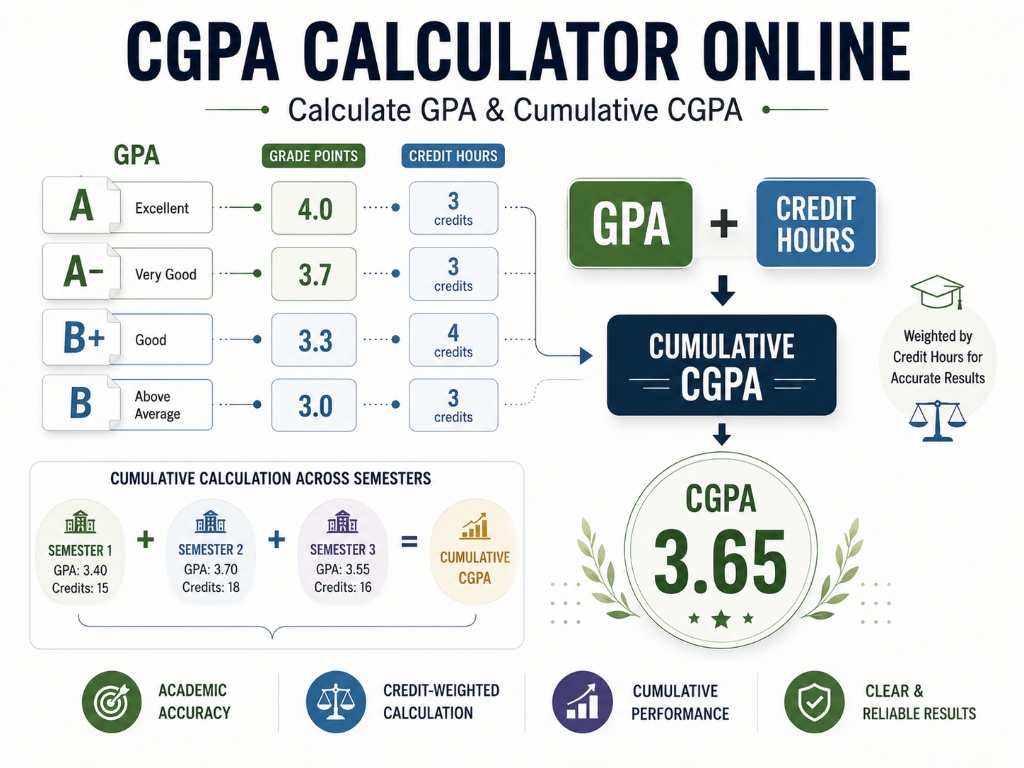
When you have completed multiple semesters, you can calculate your cumulative CGPA directly from your individual semester GPAs, provided you know the credit hours earned in each term:
CGPA = [ (GPA1 × Credits1) + (GPA2 × Credits2) + ... ] ÷ Total Credits
Why Simply Averaging Semester GPAs Is Inaccurate
Students often make the mistake of adding their semester GPAs together and dividing by the number of semesters. This simple average is mathematically incorrect whenever semester credit loads differ.
Consider a student with the following two semesters:
- Semester 1 (12 Credits): Semester GPA = 4.00 → Quality Points =
12 × 4.00 = 48.0 - Semester 2 (18 Credits): Semester GPA = 3.00 → Quality Points =
18 × 3.00 = 54.0
If you mistakenly take an unweighted average of the two GPAs:
Unweighted Average = (4.00 + 3.00) ÷ 2 = 3.50 (Incorrect)
Calculating the true credit-weighted CGPA:
Total Quality Points = 48.0 + 54.0 = 102.0
Total Credits = 12 + 18 = 30.0
True Cumulative CGPA = 102.0 ÷ 30.0 = 3.40 (Correct)
The unweighted calculation creates an artificial 0.10 error because it fails to give the 18-credit term its proper 60% proportional weight.
CGPA Calculator With Credit Hours
Using a cgpa calculator with credit hours is essential because credit hours serve as mathematical weighting factors. A 4-credit lecture course contributes twice as much to your cumulative GPA as a 2-credit elective when grade points differ.
When inputting your data into the calculator, always use the official academic credit hours listed in your course syllabus or university catalog. Do not confuse weekly contact hours or lab attendance hours with academic credit units (for example, a 3-hour weekly laboratory section may only be awarded 1 academic credit).
Supported CGPA Grading Scales
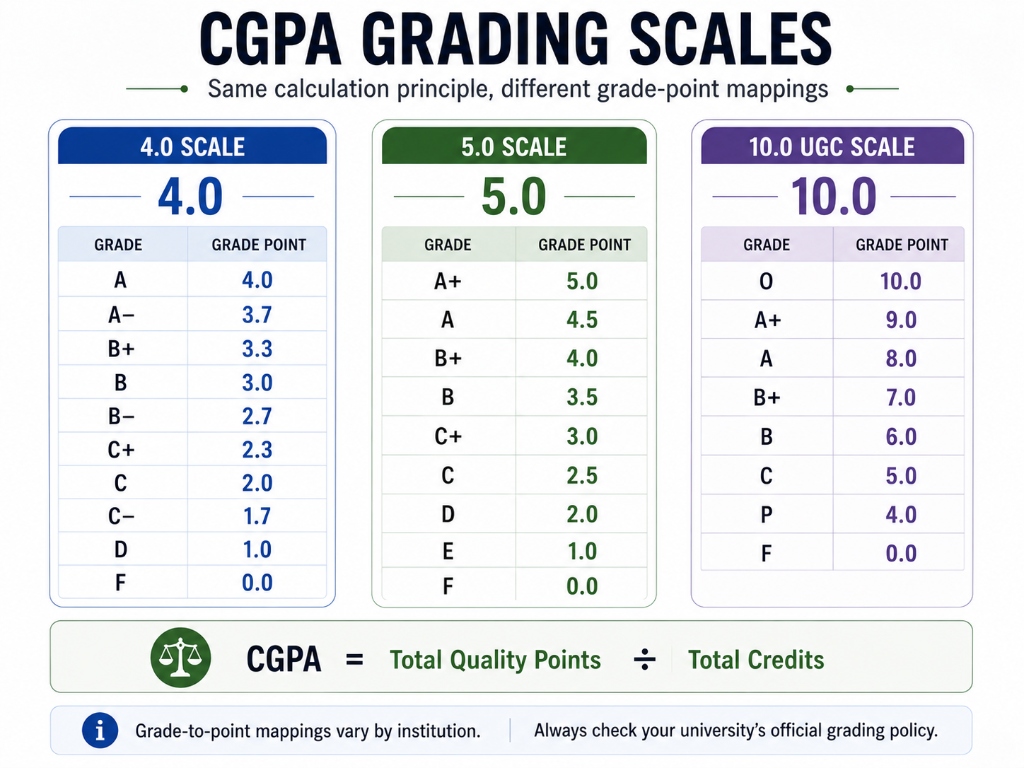
The CoditTools CGPA calculator supports the three primary grading scales used in higher education:
| Grading Scale | Scale Maximum | Supported Letter Grades and Point Values | Primary Geographic / Academic Use |
|---|---|---|---|
| 4.0 Scale (Standard) | 4.0 | A (4.0), A- (3.7), B+ (3.3), B (3.0), B- (2.7), C+ (2.3), C (2.0), C- (1.7), D (1.0), F (0.0) | United States, Canada, and American-curriculum international institutions |
| 5.0 Scale | 5.0 | A+ (5.0), A (4.5), B+ (4.0), B (3.5), C+ (3.0), C (2.5), D (2.0), E (1.0), F (0.0) | Select universities across Europe, the Middle East, and West Africa |
| 10.0 Scale (10-Point / UGC) | 10.0 | O (10.0), A+ (9.0), A (8.0), B+ (7.0), B (6.0), C (5.0), P (4.0), F (0.0) | India (UGC Choice Based Credit System) and South Asian universities |
Note: Grade-to-point mappings vary by institution. Use the grading scale and grade definitions that match your university's official policy.
How to Calculate CGPA in Excel or Google Sheets
If you want to track your academic standing in a spreadsheet, you can compute your credit-weighted CGPA using the SUMPRODUCT function:
=SUMPRODUCT(Grade_Points_Range, Credit_Hours_Range) / SUM(Credit_Hours_Range)
Example: =SUMPRODUCT(B2:B6, C2:C6) / SUM(C2:C6)
In this formula, B2:B6 represents your column of numeric grade points, and C2:C6 represents your column of assigned credit hours. SUMPRODUCT multiplies each grade point by its corresponding credit hours and adds them together, while SUM totals the credit hours.
You can also copy your spreadsheet rows and paste them directly into the CoditTools CGPA calculator via the Paste Spreadsheet Data feature for instant validation without writing formulas.
CGPA for Multiple Semesters
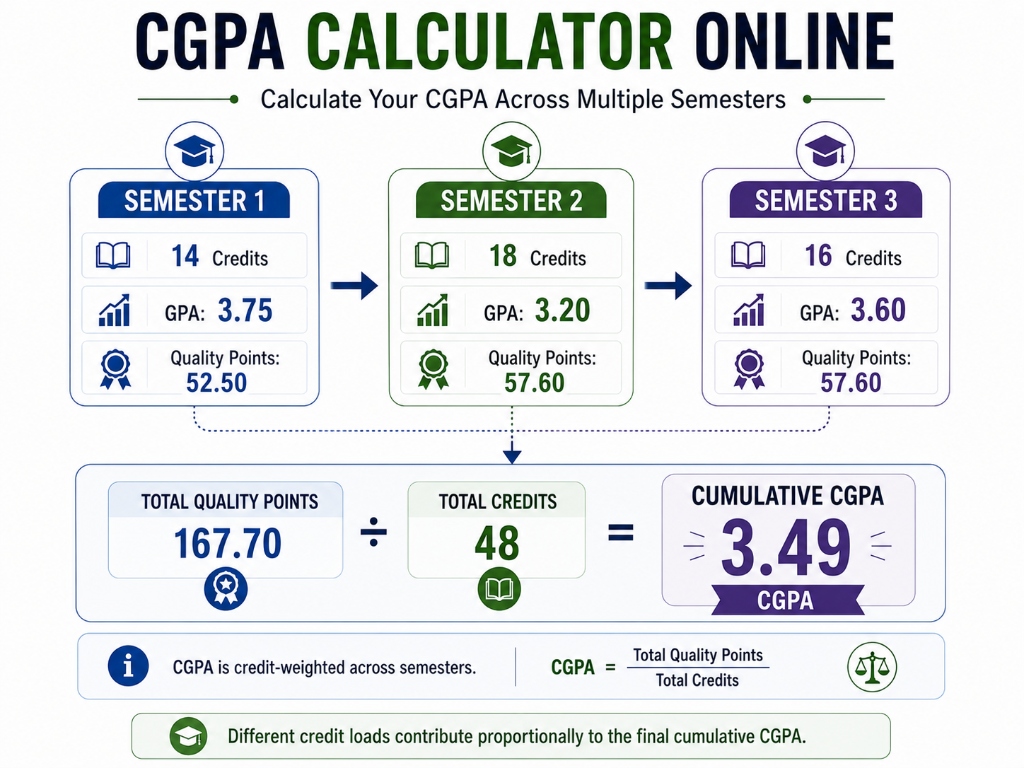
When tracking your degree progress across multiple academic terms, the calculator aggregates your cumulative records term by term. Below is a verified 3-semester academic progression:
| Academic Semester | Completed Credits | Semester GPA (SGPA) | Term Quality Points (Credits × SGPA) |
|---|---|---|---|
| Semester 1 | 14 | 3.75 | 14 × 3.75 = 52.50 |
| Semester 2 | 18 | 3.20 | 18 × 3.20 = 57.60 |
| Semester 3 | 16 | 3.60 | 16 × 3.60 = 57.60 |
| Cumulative Academic Total | 48 Credits | - | 167.70 Total Quality Points |
Calculating the true multi-semester CGPA:
Cumulative CGPA = 167.70 Total Quality Points ÷ 48 Total Credits = 3.49375 ≈ 3.49
GPA vs SGPA vs CGPA
Students frequently encounter multiple GPA terms on academic transcripts and application forms. The table below summarizes their key differences:
| Academic Term | Full Meaning | Measurement Scope |
|---|---|---|
| GPA | Grade Point Average | General term for the weighted grade point average across any defined group of courses. |
| SGPA | Semester Grade Point Average | Grade point average calculated strictly for a single academic semester or quarter. |
| CGPA | Cumulative Grade Point Average | The cumulative, credit-weighted grade point average across all completed semesters toward a degree. |
For a complete breakdown of administrative differences and transcript rules, read our dedicated guide on GPA vs CGPA.
Common CGPA Calculation Mistakes
To ensure your calculated CGPA matches your official university transcript, avoid these frequent calculation errors:
- Averaging Semester GPAs Without Weighting: Never calculate cumulative CGPA by taking a simple average of semester GPAs unless all semesters contain identical credit loads.
- Entering Contact Hours Instead of Credit Hours: Always enter official course credit units rather than weekly classroom contact hours.
- Selecting the Wrong Grading Scale: Verify whether your university utilizes a 4.0, 5.0, or 10.0 UGC grading scale before selecting grades.
- Premature Decimal Rounding: Keep quality points to two or three decimal places until completing the final division step.
- Assuming Institutional Policies Are Universal: Policies regarding repeated courses (grade replacement vs. grade averaging), withdrawals (W), pass/fail (P/NP) courses, and transfer credits vary by university. Always check your university registrar handbook.
Can CGPA Be Converted to Percentage?
There is no single universal formula to convert CGPA to a percentage across all universities worldwide. Different academic boards and institutions establish their own official conversion ordinances (for example, CBSE and AICTE in India use Percentage = CGPA × 9.5, whereas VTU uses Percentage = (CGPA - 0.75) × 10, and standard US 4.0 universities do not recognize percentage conversions).
To look up specific conversion guidelines and institutional tables, consult our comprehensive guide on how to convert CGPA to percentage. You can also calculate arbitrary percentage ratios directly with our free percentage calculator.
How to Plan a Target CGPA
You can use the calculator to test future grade scenarios. If you want to determine the exact average GPA you must earn in remaining semesters to achieve a specific graduation target, use the Reverse Target GPA Formula:
Required Future GPA = [ (Target CGPA × Final Total Credits) - Current Quality Points ] ÷ Remaining Credits
Target Calculation Example
- Current Academic Standing: 60 completed credits with a current CGPA of 3.10 (
60 × 3.10 = 186.0 Quality Points). - Total Degree Requirements: 120 credits.
- Remaining Workload:
120 - 60 = 60 creditsremaining. - Target Graduation CGPA: 3.50 (Honors cutoff).
Calculation steps:
- Total Quality Points Needed at Graduation:
120 Total Credits × 3.50 Target = 420.0 Quality Points. - Quality Points Still Required:
420.0 Needed - 186.0 Current = 234.0 Quality Points. - Required Average GPA Over Remaining 60 Credits:
234.0 Points ÷ 60 Remaining Credits = 3.90 GPA.
Note: This is a mathematical planning estimate. Your university’s specific grading criteria and course availability will determine your actual academic standing.
Related Academic & CGPA Guides
To explore specific aspects of academic grading systems in detail, refer to our companion resources:
- How to Calculate CGPA: Formula, Credit Hours, GPA to CGPA & Examples – Deep dive into credit-hour mechanics, manual calculation proofs, and spreadsheet implementations.
- GPA vs CGPA: What’s the Difference and How Are They Calculated? – Detailed comparison of term GPA, cumulative CGPA, SGPA, and major GPA.
- How to Convert CGPA to Percentage: Formula, Examples & University-Specific Methods – Reference guide of university-specific percentage conversion formulas.
Frequently Asked Questions
What is an online CGPA calculator?
An online CGPA calculator is a digital tool that computes your Cumulative Grade Point Average by multiplying course grades by their assigned credit hours to determine quality points, summing those points, and dividing by total attempted credit hours.
How do I calculate CGPA?
To calculate CGPA, multiply each course grade point by its credit hours to find quality points, sum the quality points across all courses, and divide by the total number of attempted credit hours.
How do I calculate CGPA from GPA?
To calculate CGPA from semester GPAs, multiply each semester GPA (SGPA) by its completed credit hours to obtain term quality points, add all term quality points together, and divide by the total cumulative credit hours completed.
How do credit hours affect CGPA?
Credit hours serve as mathematical weights. A 4-credit course contributes twice as much toward your overall GPA as a 2-credit course with the same letter grade.
Can I calculate CGPA for multiple semesters?
Yes. In the CoditTools CGPA calculator, you can calculate multiple semesters either by adding new semester cards in Course Mode or by entering each term’s SGPA and credits in Semester GPA Mode.
How do I calculate CGPA in Excel?
In Excel, calculate credit-weighted CGPA using the formula =SUMPRODUCT(Grade_Points_Range, Credit_Hours_Range) / SUM(Credit_Hours_Range).
What grading scales does the CoditTools CGPA calculator support?
The calculator supports the standard 4.0 scale (US/Canada), the 5.0 scale (select international universities), and the 10.0 UGC scale (India and South Asia).
Can I use semester GPA to calculate CGPA?
Yes. Switch to Semester GPA Mode in the calculator, enter each semester’s SGPA and completed credit hours, and the tool will compute your credit-weighted cumulative CGPA automatically.
Is CGPA the same as GPA?
No. GPA can refer to a single semester or term average (SGPA), while CGPA represents your cumulative grade point average across all completed semesters throughout your degree program.
Can CGPA be converted to percentage?
CGPA can be converted to percentage only by using your university’s official formula (such as CBSE/AICTE’s CGPA × 9.5). There is no universal formula. You can verify calculations using our percentage calculator.
Try the tools mentioned in this post - all free, no account needed.
Runs in your browser. No watermarks. No file uploads to a server.
Browse math calculators →