How to Check the Readability Score of Your Content Online for Free
How Flesch Reading Ease is calculated, a worked before-and-after example, why tools disagree, and how to check readability in Word or with the CoditTools checker.
A readability score estimates how hard a text is to read from two things only: how long its sentences are and how long its words are. The most common one, Flesch Reading Ease, runs from 0 to 100, and higher means easier; around 60 to 70 suits most general writing. The score is good at finding sentences that are too long. It can't tell you whether the text is clear, accurate or right for its readers.
This guide shows how the score is calculated, works through a real before-and-after example, explains why different tools give different scores for the same text, and covers how to check readability in Microsoft Word and with the free CoditTools Readability Checker.
How the Flesch score is calculated
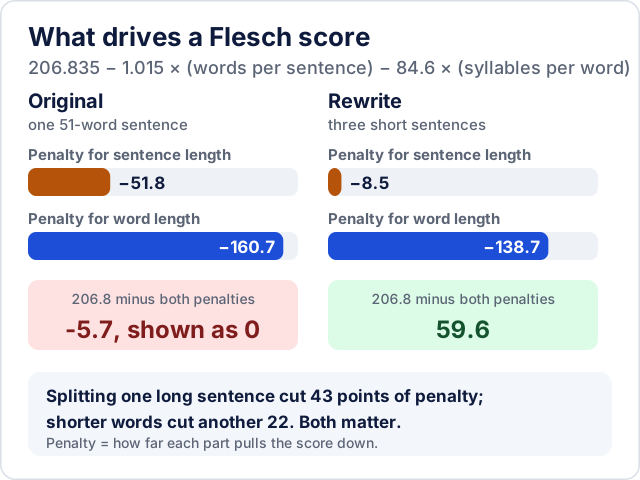
Reading Ease = 206.835 − 1.015 × (words ÷ sentences) − 84.6 × (syllables ÷ words)Every extra word per sentence costs about one point, and every extra syllable per word costs a lot more (84.6 points per syllable on average). The related Flesch-Kincaid Grade Level uses the same two averages, 0.39 × (words ÷ sentences) + 11.8 × (syllables ÷ words) − 15.59, and expresses the result as a US school grade. Microsoft, which builds both into Word, publishes these formulas and suggests aiming for a Reading Ease of about 60 to 70 and a grade level of about 7 to 8 for most documents (Microsoft Support).
Neither formula looks at meaning, vocabulary familiarity, layout or the reader's background. A text full of short, common words can be confusing, and a precise technical paragraph can score badly while being exactly right for specialists.
A worked example: one sentence, rewritten
Here is a typical sentence from an instructions page:
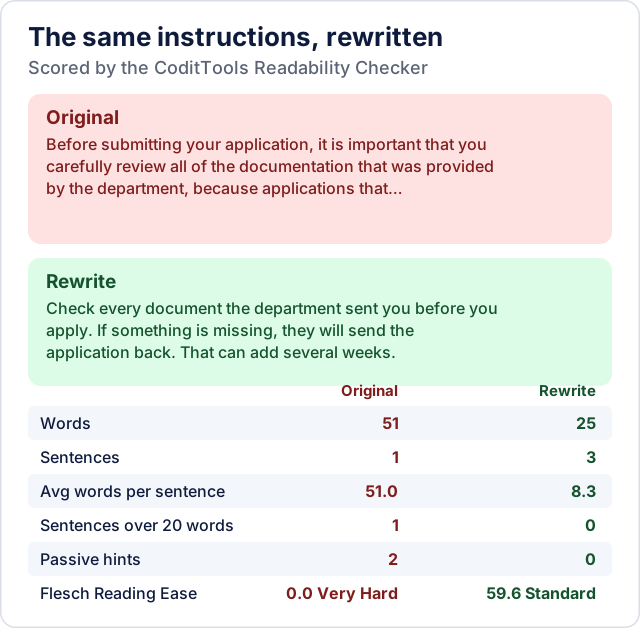
Before submitting your application, it is important that you carefully review all of the documentation that was provided by the department, because applications that are submitted without the required supporting information will typically be returned to the applicant for correction, which can delay the processing of the request by several weeks.
And the same instructions rewritten:
Check every document the department sent you before you apply. If something is missing, they will send the application back. That can add several weeks.
Run through the CoditTools checker, the two versions compare like this:
| Measure | Original | Rewritten |
|---|---|---|
| Words | 51 | 25 |
| Sentences | 1 | 3 |
| Average words per sentence | 51.0 | 8.3 |
| Flesch Reading Ease | 0.0 (Very Hard) | 59.6 (Standard) |
| Sentences over 20 words | 1 | 0 |
| Passive hints | 2 | 0 |
The original's formula result is actually below zero; the tool shows it as 0. What changed is not just the score. The rewrite leads with the action, drops the filler ("it is important that you", "typically") and splits one idea per sentence, so it is half the length and says the same thing. That is the useful way to read a low score: find the longest sentences, and ask what each one is trying to say.
Why tools give different scores for the same text
The formula is standard, but every tool has to count words, sentences and syllables itself, and those counts are approximations. Using the CoditTools checker as an example:
- Sentences are split at full stops, question marks and exclamation marks. Abbreviations and decimals therefore create extra "sentences": in "Bring two documents, e.g. a passport and a utility bill. The fee is 3.50 per page." the checker counts 5 sentences instead of 2, which pushes the score up to 92.5. Text without full stops, such as bullet lists or headings pasted together, has the opposite effect.
- Syllables are estimated from groups of vowels, with a silent final "e" removed. That works for most words but undercounts some: "simple", "people" and "create" are each counted as one syllable. Other tools use different rules or dictionaries, so the same text can differ by several points.
- Passive voice is only a hint. The checker looks for "is/are/was/were/been/being" followed by a word ending in "-ed", so it catches "was completed" but not irregular forms like "was written" or "were found".
The practical rule: compare scores only within one tool. Use the score to compare two drafts of the same text, not to compare your text with a number someone got in another program.
How to check readability in Microsoft Word
Word can show Flesch Reading Ease and the Flesch-Kincaid Grade Level after a spelling and grammar check. In Word for Windows, according to Microsoft's instructions:
- Go to File > Options > Proofing.
- Under "When correcting spelling and grammar in Word", make sure "Check grammar with spelling" is selected, then select "Show readability statistics".
- Back in the document, run Spelling & Grammar (Review tab) and work through or ignore the suggestions.
- When the check finishes, the Readability Statistics window appears with the counts, averages and both scores.
Microsoft 365 subscribers on the Current Channel can also use Home > Editor > Document stats. Word's counts follow its own rules, so expect small differences from the CoditTools checker for the reasons above.
Using the CoditTools Readability Checker
Paste your text into the Readability Checker and the results update as you type. It shows:
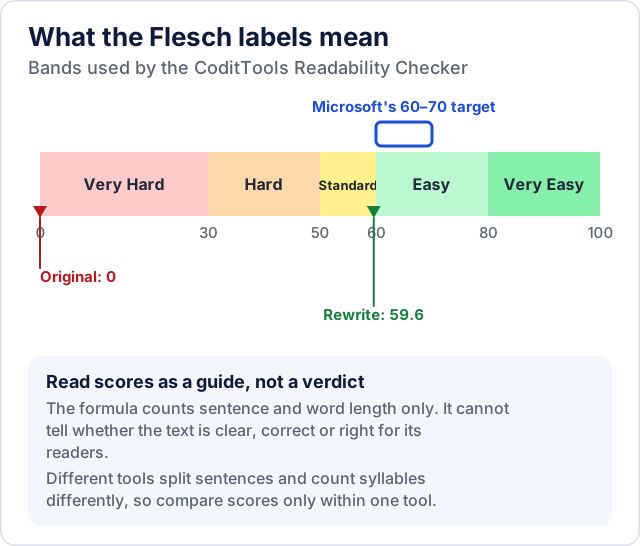
- the Flesch Reading Ease score, limited to the 0–100 range, with a label: Very Easy (80+), Easy (60–79), Standard (50–59), Hard (30–49) or Very Hard (below 30);
- average words per sentence and the word count;
- how many sentences are longer than 20 words;
- how many likely passive phrases it found.
It does not calculate the Flesch-Kincaid Grade Level, Gunning Fog or SMOG, and it counts long sentences and passive phrases without highlighting them, so search your draft for them yourself. The text is analysed in your browser and not uploaded.
A good routine is to check one section at a time. A whole article's average can look fine while one paragraph scores far below the rest, and that paragraph is the one to rewrite.
What score to aim for
Use Microsoft's 60–70 Reading Ease as a starting point for general audiences, then adjust for who is reading:
- Instructions, forms and anything people must act on: aim at the top of that range or above. Short sentences reduce mistakes.
- Marketing and landing pages: readers skim, so short sentences and familiar words help.
- Technical documentation for specialists: a lower score is normal because correct terms are long words. Don't replace a precise term with a vague one to gain points; shorten the sentences around it instead.
- Legal and academic text: scores are usually low and precision matters more. Readability formulas are a weak guide here.
Whatever the target, the best check is still a real reader. If you can, ask someone from the intended audience to read the text and tell you where they had to stop. To polish the draft further, the word counter and sentence counter help you find long passages, and the meta title and description checker helps when the text is going on a web page.
Try the tools mentioned in this post - all free, no account needed.
Runs in your browser. No watermarks. No file uploads to a server.
Browse text tools →