How to Merge PDF Files Online: Order, Size and What a Merge Drops
Merge PDFs in your browser, and learn what a merge keeps (pages, links) and drops (bookmarks, fillable fields, title), tested with the tool's own library.
To combine PDFs you add the files in the order you want, merge, and download one file. The browser-based CoditTools Merge PDF tool does that without an account and without uploading anything. What is worth knowing before you rely on it is what a merge keeps and what it drops: pages, text, images and links come through, but bookmarks, fillable form fields and the document title do not.
This guide covers the steps, then those limits (which we tested with the same library the tool uses), then what to do for the cases a simple merge can't handle.
How to merge PDFs on CoditTools
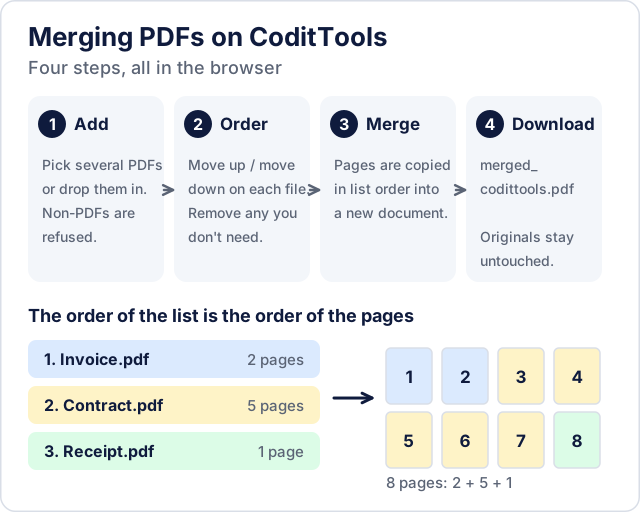
- Open Merge PDF and add your files. You can pick several at once in the file dialog or drop them onto the upload area. A selection that includes anything that isn't a PDF is refused as a whole, and the message names the offending file.
- Put the files in order. Each file in the list has a move up and a move down button, plus a remove button. The order of the list is the order of the pages in the result.
- Click merge. The pages of each file are copied, in order, into a new document.
- The result downloads as
merged_codittools.pdf.
The merge happens in your browser, so the files are not uploaded. A file that can't be opened (damaged, not really a PDF, or password-protected) stops the merge with a message naming the file, so you can remove it and try again. Merging doesn't re-render anything: each page keeps its size, so an A4 file and a US Letter file stay A4 and Letter in the combined document.
What survives a merge and what doesn't
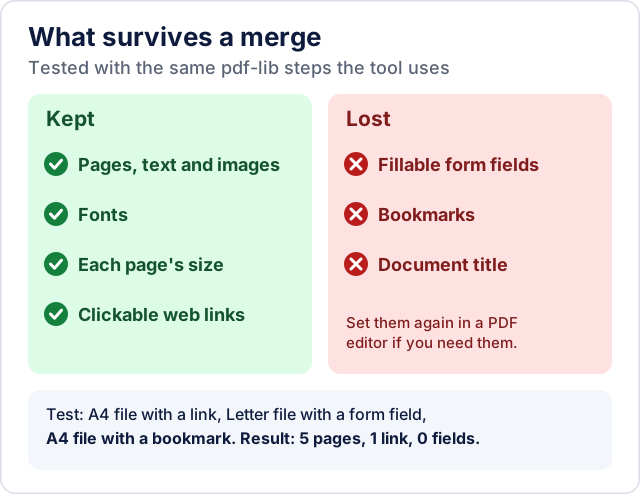
The tool builds a new PDF and copies each source page into it. We checked what that does by merging three test files with the same pdf-lib library and the same sequence of steps the tool uses: an A4 file with a clickable link and a title, a US Letter file with a form field, and an A4 file with a bookmark.
| In the source files | In the merged file |
|---|---|
| Pages, text, images and fonts | Kept; page sizes unchanged (A4, Letter, A4 in the test) |
| A clickable web link | Kept |
| Fillable form field | Lost: the merged file had no form fields |
| Bookmarks (outline panel) | Lost |
| Document title (File > Properties) | Lost: the merged file has no title |
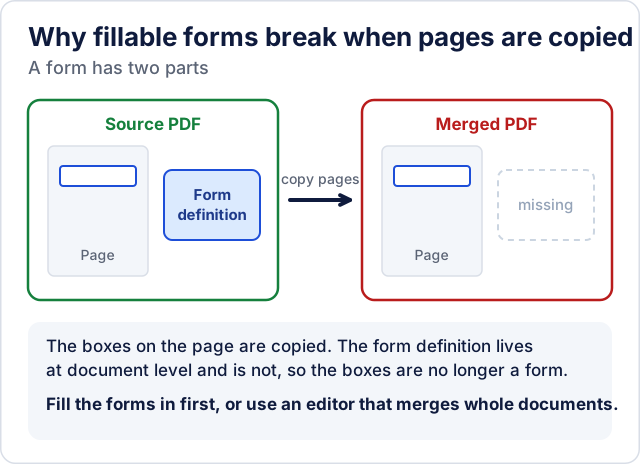
The form field is the one that surprises people. A fillable PDF stores its boxes on the pages, but the definition of the form as a whole lives at the document level, outside the pages. A merge that copies pages leaves that definition behind, so the boxes no longer behave as a form. This is a common limitation of page-copying PDF merging, not something specific to one tool (this write-up explains the mechanism). If two files came from the same form template, their fields also share names, which causes further problems in tools that do keep forms.
What to do about it:
- Fillable forms: fill in and save each form first, then merge. If the result must stay editable, use a PDF editor that merges whole documents rather than copying pages, and open the result to confirm that the fields are still fillable before you send it.
- Bookmarks and a table of contents: merge, then add bookmarks in a PDF editor. If the pages are all you need, nothing to do.
- Title: set the title in your PDF viewer's document properties after merging if the title matters (some viewers show it in the window title).
Planning the merge
- Order: check the list before you merge. If the order is wrong, you have to merge again, but the original files are untouched, so nothing is lost.
- Sizes: the merged file is roughly the sum of its parts, so ten 20 MB files give a file around 200 MB. If you need to email or upload the result, reduce the largest files first or run the merged file through Compress PDF; see how PDF compression works and why some files don't shrink.
- Page orientation and size: mixed sizes merge fine but print and display with different page shapes. If a result looks inconsistent, the cause is in the source files.
- Phone photos and scans: to combine images into a PDF, use Images to PDF first, then merge that PDF with the others.
- Only some pages needed: cut the pages you want out of a long file with PDF Splitter before merging.
Other ways to merge PDFs
On a Mac you don't need any tool: open the PDFs in Preview, show the thumbnail sidebar, and drag one file's pages (or the whole file from Finder) into the other's sidebar, as Apple's Preview guide describes. Apple warns that Preview saves changes automatically, so duplicate the files first if you want to keep the originals. For documents with forms or bookmarks that must survive, use an editor that merges whole documents, and check the result, because even those can lose fillable fields (Adobe's own user forum has threads about exactly that).
For a plain stack of pages, such as invoices, receipts, scanned forms and assignments, the browser tool is the faster choice and keeps the files on your device.
Try the tools mentioned in this post - all free, no account needed.
Runs in your browser. No watermarks. No file uploads to a server.
Browse PDF tools →