Finance Calculators: Which to Use and What Each One Assumes
Match 12 finance calculators to your question, with the assumptions behind each: flat-rate salary and tax, constant returns, no inflation adjustment.

The finance calculators on CoditTools answer different questions and make different assumptions, and two of them (salary and tax) use a flat rate that you type in, not a tax table. This guide matches each question to the right calculator, shows what each one assumes, and lists what it leaves out, so you can judge how far to trust a result. Every figure below was produced by the calculators' own formulas using the default values shown in each tool.
None of this is financial, tax or investment advice. A calculator turns your assumptions into arithmetic; the assumptions are the part that needs checking.
Which calculator answers which question?
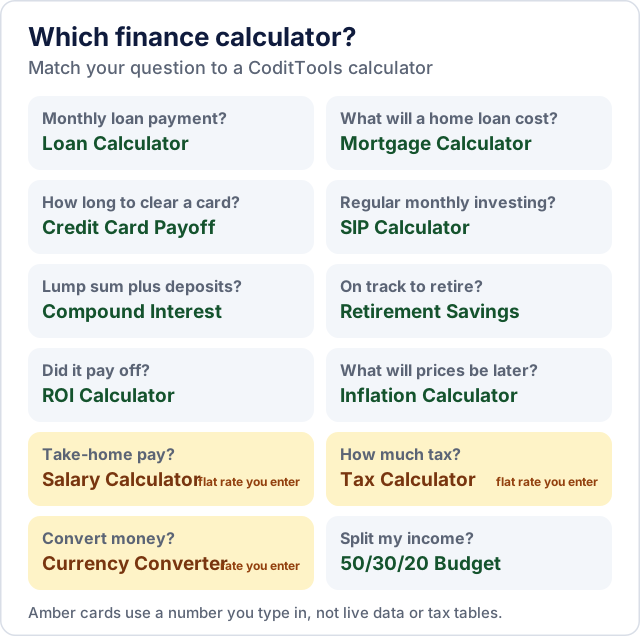
| Your question | Calculator | What you enter | What it assumes |
|---|---|---|---|
| What will my monthly loan payment be, and how much interest will I pay? | Loan Calculator | Amount, rate, term; optional extra payment | Fixed rate, equal monthly payments, no fees (worked example) |
| What will a home loan cost? | Mortgage Calculator | Home price, down payment, rate, years | Principal and interest only; no property tax, insurance or closing costs |
| How long will it take to clear a credit card? | Credit Card Payoff Calculator | Balance, APR, a fixed monthly payment or a minimum-payment rule | Interest charged monthly on the balance; it compares paying a fixed amount with paying only the minimum |
| What will regular monthly investing grow to? | SIP Calculator | Monthly amount, expected return, years | Constant return, compounded monthly, each deposit made at the start of the month |
| What will a lump sum plus monthly deposits grow to? | Compound Interest Calculator | Starting amount, monthly contribution, rate, years | Same monthly compounding at a constant rate |
| Am I on track for retirement? | Retirement Savings Calculator | Ages, current savings, contribution, return, target income | A 4% annual withdrawal, with the result not adjusted for inflation |
| Did this investment or expense pay off? | ROI Calculator | Investment, final value, extra costs, years | One lump investment and one final value; no interim cash flows |
| What will prices or costs be later, and what is my money worth? | Inflation Calculator | Amount, annual inflation, years | A single constant inflation rate |
| What is my take-home pay? | Salary Calculator | Salary, bonus, tax rate %, other deductions % | A flat tax rate that you supply |
| How much tax might I owe? | Tax Calculator | Income, deductions, tax rate %, credits | A single flat rate; no brackets |
| How much will I get when I convert money? | Currency Converter | Amount, exchange rate, fee % | The rate you type in; it does not fetch live rates |
| How should I split my income? | 50/30/20 Budget Calculator | After-tax income, percentages | Percentages you can change; it only divides |
| What am I worth on paper? | Net Worth Calculator | Assets and debts | The values you enter; it does not value anything |
The salary and tax calculators use a flat rate you enter
Most income tax systems tax slices of income at different rates (brackets), and the amount that is taxed depends on allowances and rules that differ by country and year. The Salary Calculator and Tax Calculator do not contain any country's tax rules. They multiply by whatever percentage you enter:
- Salary: gross pay (salary plus bonus) × your tax rate, minus gross pay × your other-deductions rate. With the defaults (60,000 salary, 5,000 bonus, 18% tax, 5% other deductions) that gives 11,700 tax, 3,250 other deductions and 50,050 net, or 4,170.83 a month.
- Tax: (income − deductions) × your rate − credits. With the defaults (80,000 income, 10,000 deductions, 22%, 1,500 credits) the tax due is 13,900, which is an effective rate of 17.38% of gross income.
That is useful for a quick "what if" once you know your rate. To find a realistic rate, take your effective rate from last year's tax return or a payslip (total tax ÷ total income), not the top bracket your income reaches. For anything that determines what you actually pay, use your tax authority's calculator or a tax professional.
What compounding does to a long investment
Because growth builds on earlier growth, small differences in return grow into big differences in the result. Using the Compound Interest Calculator with a 10,000 starting amount and 250 a month for 20 years:
| Annual return | Total you put in | Value after 20 years | Growth |
|---|---|---|---|
| 5% | 70,000 | 130,313 | 60,313 |
| 7% | 70,000 | 171,379 | 101,379 |
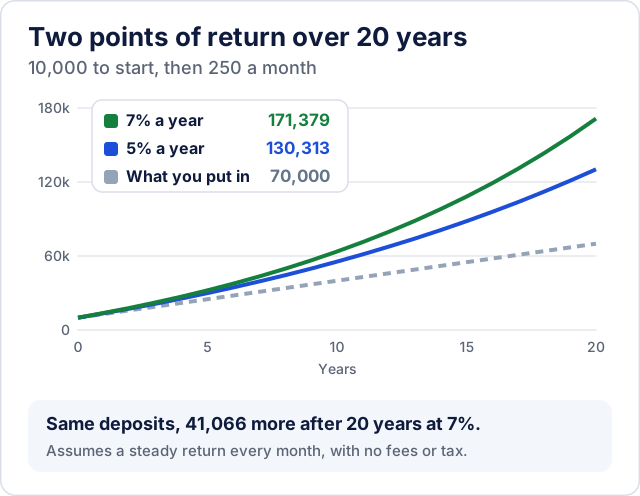
You contribute the same amount in both rows, yet two extra percentage points produce about 41,000 more. The calculators assume a smooth, constant return every month. Real investments move up and down, and fees and taxes reduce what you keep, so treat the result as one scenario and compare a cautious rate with an optimistic one.
The SIP Calculator uses the same monthly compounding for a regular monthly investment with no starting amount: with its defaults (500 a month, 12% return, 15 years) you put in 90,000 and it estimates 252,288 at the end. A 12% constant return is a very optimistic assumption in most markets, so try a lower rate too.
Inflation changes what a result is worth
A future sum buys less than the same sum today. The Inflation Calculator shows both directions: at 5% a year, something that costs 10,000 today costs 16,288.95 in ten years, and 10,000 in ten years will buy what 6,139.13 buys today.
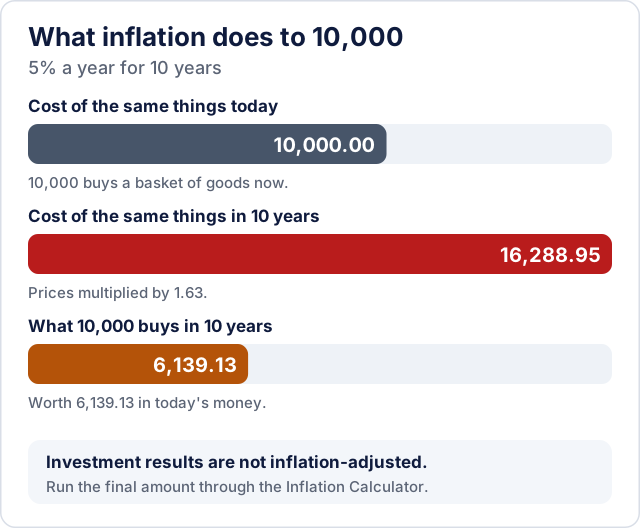
The investment calculators don't adjust for inflation, so a result like "252,288 after 15 years" is a nominal figure. To compare it with today's prices, run the final amount through the inflation calculator (years ahead = the investment period) and read "Future Value in Today's Money". The same applies to the Retirement Savings Calculator: its 30-year default scenario ends with an estimated corpus of 1,023,541, which is a future-dollar figure.
Reading the retirement estimate
The Retirement Savings Calculator grows your savings and contributions at your expected return until retirement, then turns the total into an income by taking 4% of it a year, divided by 12. The 4% figure is a rule of thumb for how much a portfolio can pay out each year; how safe a withdrawal rate is depends on the markets, your time horizon and your country, so don't treat it as a guarantee. With the defaults (age 30 to 60, 25,000 saved, 500 a month, 8%) it estimates 3,411.80 a month against a 3,000 target, a gap of 411.80 in your favour, before inflation, taxes and fees.
Reading the ROI figure
The ROI Calculator adds fees to the cost before measuring the gain. With the defaults (10,000 invested, 250 of costs, 14,500 final value, 3 years) the net profit is 4,250 on a cost of 10,250, a 41.46% ROI, which equals 12.26% a year when annualised. The annual figure is the one to compare with other options, because 41% over three years and 41% over ten years are very different results. It treats the investment as one payment and one final value, so it is not suitable when you added or withdrew money along the way.
Two of the calculators don't use the internet
The Currency Converter multiplies by the exchange rate you type, then subtracts a fee percentage, so it is only as accurate as the rate you enter: 1,000 USD at 0.92 with a 1.5% fee gives 906.20 EUR. Check a current rate from your bank or card provider first. Likewise, the Net Worth Calculator adds up and subtracts what you type: with the defaults, assets of 290,000 less debts of 122,500 give a net worth of 167,500 and a debt-to-asset ratio of 42.24%. The number is only as good as the values you put in, especially for property and investments.
Before you act on a result
- Check the inputs first. Is the rate annual or monthly, a rate or a total? Most calculators here ask for annual rates.
- Add the costs the calculators leave out: loan fees and insurance, property taxes, investment fees and taxes on gains.
- Run a range. Re-run with a lower return and a higher cost and see whether the plan still works.
- Use official sources for official numbers: your lender's repayment schedule, your tax authority's tools, your payslip.
For a payslip or an invoice rather than an estimate, see the payslip generator and invoice generator; the full list of calculators is in the finance category.
Try the tools mentioned in this post - all free, no account needed.
Runs in your browser. No watermarks. No file uploads to a server.
Browse finance calculators →