How to Download Instagram Reels Without Watermark - Free Online Tool, No Login
Download Instagram Reels without watermark free online. Save public Instagram videos to your device. No app, no login needed. Covers what the tool can and cannot do.
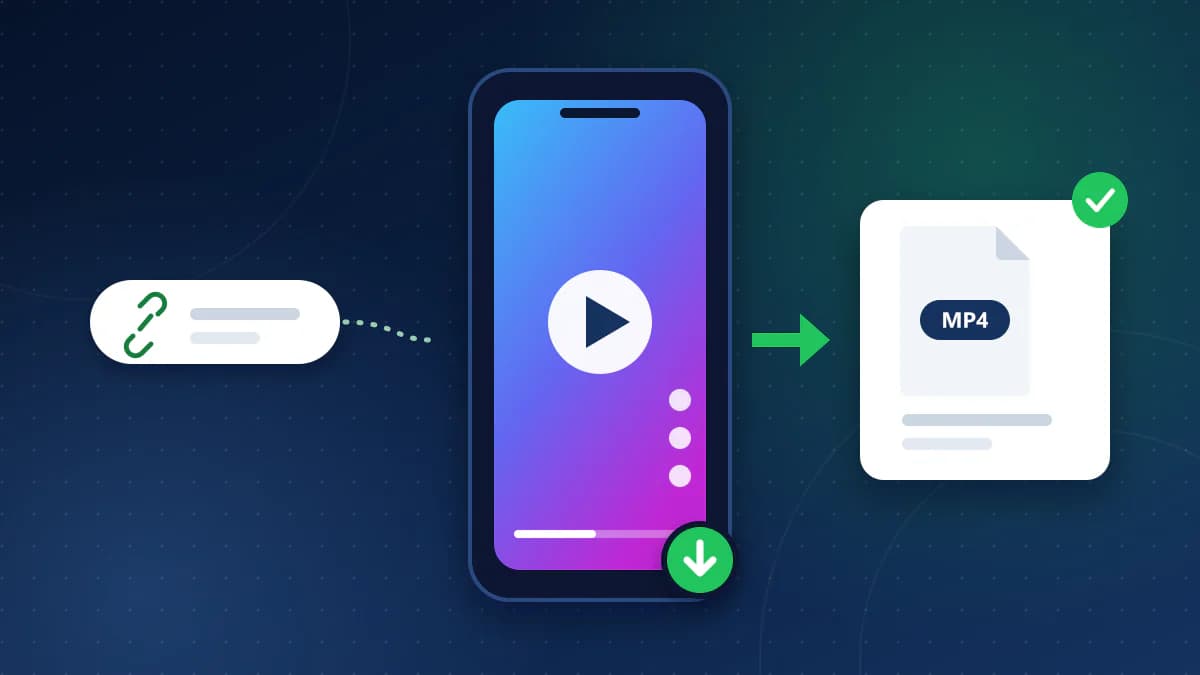
To save a public Instagram Reel as a video file, copy the Reel's link, paste it into the CoditTools Instagram Reels Downloader, press Fetch Reel, check the preview and press Download. You get an MP4 file, with no Instagram login and nothing to install. It only works for Reels that anyone can open without logging in.
The rest of this page covers what "without watermark" does and doesn't mean, which tool to use for other kinds of Instagram links, what the error messages mean, and what to keep in mind about using someone else's video.
What "without watermark" means here
The tool downloads the video as originally posted, without any added watermarks. CoditTools does not stamp its own logo or any other overlay on the picture: it fetches the video that Instagram serves for the public Reel and gives it to your browser.
Instagram also has its own Download option for public Reels, offered when the creator allows downloads. At the time of writing, a Reel saved that way carries an Instagram watermark. That is the overlay people usually want to avoid, and a file saved through this tool does not have it.
Be realistic about the limit: this applies to watermarks added by Instagram's own download feature or by a tool. If the creator burned a logo, a username or captions into the video before posting it, they are part of the video and stay in the file. Nothing here edits them out.
Download a Reel in four steps
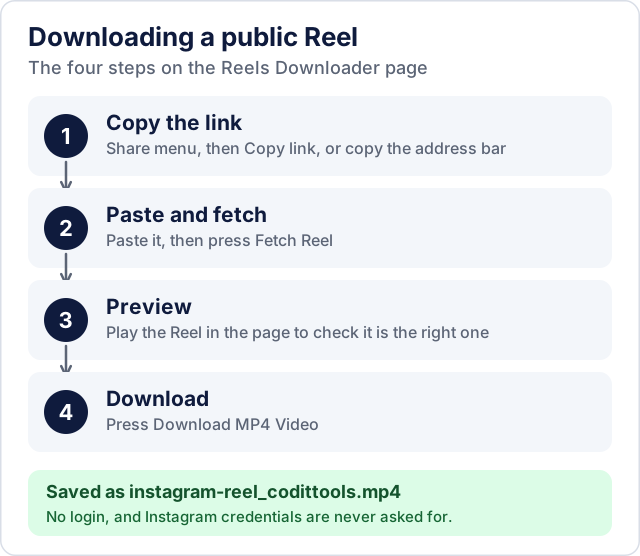
- Open the Reel in the Instagram app or on instagram.com and copy its link: use the Share button and choose Copy link, or copy the address from the browser's address bar. Links that contain
/reel/or/reels/work, including links from the app's share sheet. - Open the Reels Downloader, paste the link into the box (there is also a paste-from-clipboard button) and press Fetch Reel. Tracking text after the address is ignored.
- Play the preview to make sure it is the Reel you meant.
- Press Download MP4 Video. The file is saved as
instagram-reel_codittools.mp4. There is also a Copy Link button that copies the direct file address, and Reset clears the page.
Where the file ends up depends on your browser and phone: usually the Downloads folder, which on an iPhone is inside the Files app. If you want it in your photo library, move or save it from there.
Which tool for which link
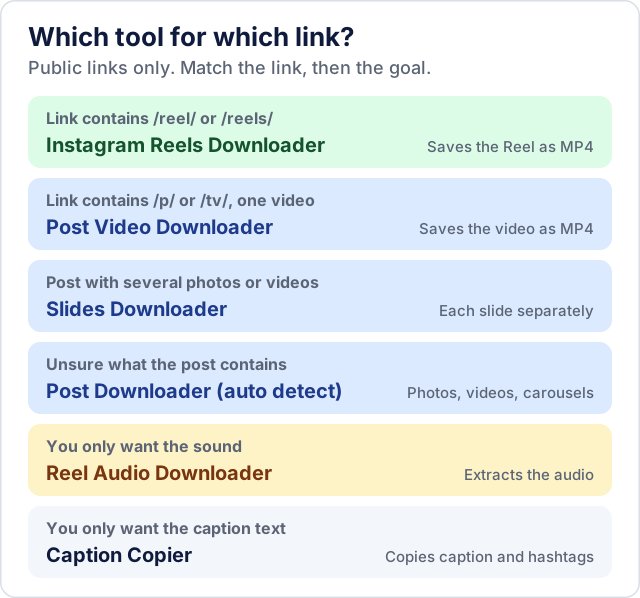
The Reels Downloader only accepts Reel links. If you paste a normal post link into it, you get a message telling you to use the post or slides tool instead. Use this as a guide:
- Instagram Post Video Downloader for a single video in the feed (links with
/p/or/tv/). - Instagram Slides Downloader for a carousel of several photos or videos, saved one slide at a time.
- Instagram Post Downloader when you are not sure what the post contains: it detects photos, videos and carousels.
- Instagram Reel Audio Downloader when you only want the sound of a Reel as an audio file.
- Instagram Caption Copier when you want the caption text and hashtags rather than the video; our guides to copying captions and copying hashtags cover the options.
If the Reel will not download
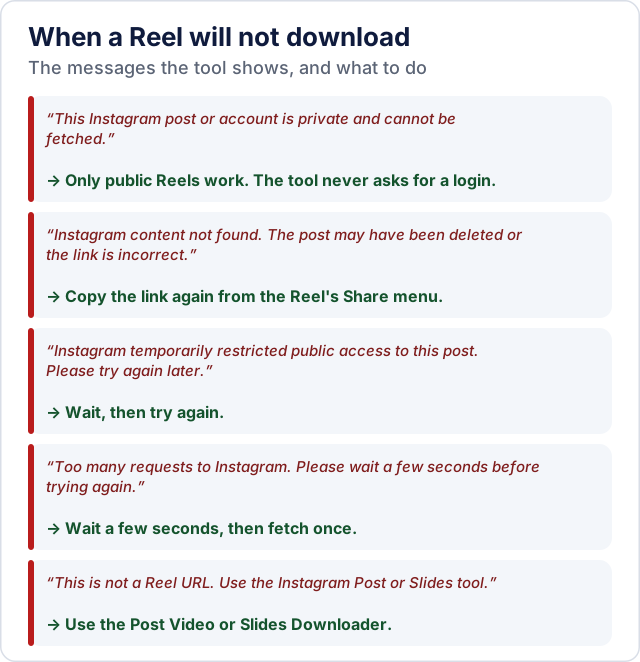
The tool shows the reason in a message at the top of the page. The common ones:
- Private account. Only public content can be fetched. The tool does not ask for your login, so it cannot see anything you would need an account or a follow to open.
- Content not found. The Reel was deleted or the link is wrong. Copy the link again from the Reel itself.
- Temporarily restricted. Instagram sometimes limits public access to a post for a while. Wait and try again.
- Too many requests. Wait a few seconds and press Fetch once. The tool allows a limited number of requests per minute from one connection, so repeated rapid clicks make it worse.
- Wrong link type. A post, TV or carousel link goes to one of the other tools above.
Instagram changes how its pages work from time to time, and a downloader that fetches public pages can stop working until it is updated. If a public Reel that opens fine in your browser keeps failing, the report a problem page is the way to tell us.
Your own Reels and other people's
The clearest uses are saving a copy of a Reel you made, keeping an offline backup before you delete or change an account, and reviewing a video you already have permission to use. For anyone else's Reel, the creator's copyright still applies to the file you download, and so do Instagram's terms of use. Having a downloadable file does not give you the right to repost it, edit it into your own content or use it commercially; ask the creator, and credit them where they agree.
What happens to the link you paste
Most CoditTools tools run entirely in your browser. This one cannot: the link is sent to the CoditTools server, which fetches the public video from Instagram and passes it to your browser. You never enter an Instagram password or any other credential. The Privacy Policy describes how server-assisted tools like this one are handled.
Try the tools mentioned in this post - all free, no account needed.
Runs in your browser. No watermarks. No file uploads to a server.
Browse all tools →