Download Audio From Instagram: How to Save a Reel's Sound as an MP3
Save a public Instagram Reel's sound as an MP3: the four steps, which links work, what the 192 kbps file is, and what to check before reusing someone's audio.
To download audio from an Instagram Reel, paste the Reel's link into the Instagram Reel Audio Downloader, press Extract Reel Audio, and when the page shows Audio Ready press Download MP3 Audio. Your browser saves a file named instagram-reel-audio_codittools.mp3. It works for public Reels only, and it saves the Reel's whole soundtrack, music and voice together, without the picture.
The tool handles the technical step. Whether you may reuse the sound is a separate question, covered in the last section.
Audio file or video file: which one you need
A Reel is a video with a sound track. The two downloads are different jobs with different tools:
| You want | Use | You get |
|---|---|---|
| Only the sound, as an audio file | Instagram Reel Audio Downloader | An MP3, no picture |
| The Reel itself, picture and sound | Instagram Reels Downloader | A video file |
Downloading the video and the audio are covered by separate tools on purpose. For the video route, including which tool suits which kind of link, see the guide to downloading Reels without a watermark. This guide covers only the audio route.
Download a Reel's audio in four steps
- Copy the Reel's full link. It should look like
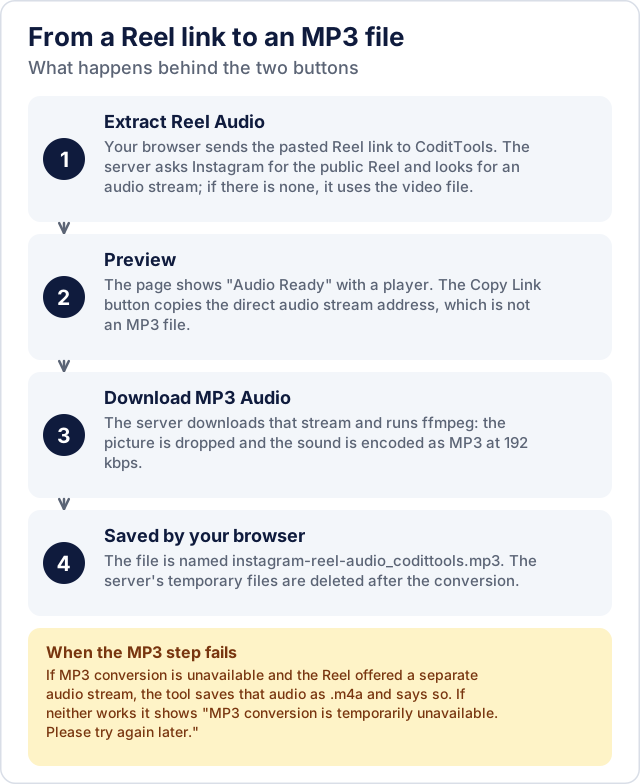
https://www.instagram.com/reel/.... The Extract Reel Audio button stays disabled until the box holds a complete link that includeshttps://and an instagram.com address, so a link pasted without the beginning will not enable it. - Paste it and press Extract Reel Audio. The clipboard icon in the box pastes for you if your browser allows it; otherwise paste by hand. The tool contacts Instagram for the public Reel and looks for its audio.
- Check the result. When Audio Ready appears, play the preview to confirm it is the right Reel. The preview plays the audio Instagram serves, and the MP3 Format label describes the file you get when you download.
- Press Download MP3 Audio. The page shows "Preparing your MP3..." while the server converts the audio, then your browser saves the file. On iPhone and iPad Safari, the tool's own tip says the file goes to Files > Downloads. Paste another Reel link clears the page for the next one.
Unlike the audio tools mentioned below, this one does not run only in your browser: CoditTools' server receives the link, retrieves the public Reel, does the MP3 conversion and then removes its temporary files. The Privacy Policy describes how data is handled. The Copy Link button next to the download button copies Instagram's direct audio stream address, which is not an MP3 file.
Which links the tool accepts
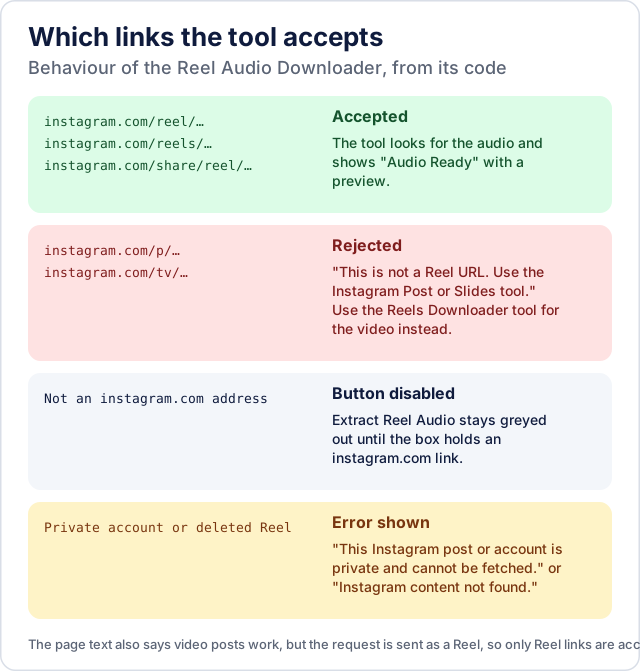
The tool asks Instagram for a Reel, so only Reel links pass: /reel/, /reels/ and /share/reel/ addresses. A link to an ordinary post or a TV link (/p/, /tv/) is rejected with "This is not a Reel URL. Use the Instagram Post or Slides tool." That message points to the picture-and-video tools, not to an audio route, so a video post cannot be turned into an MP3 here. The note under the input box says the same: "Supports public Instagram Reel links."
What the MP3 is, and what it is not
- The whole soundtrack. The tool removes the picture and keeps one audio track, exactly as the Reel plays it. Music, speech and effects stay mixed together; there is no option to isolate a voice or a song.
- A 192 kbps re-encode. On the server, ffmpeg drops the video and encodes the sound as MP3 at 192 kbps. The source is already compressed audio, and encoding it again as MP3 cannot restore detail Instagram's version did not have, so 192 kbps describes the file, not an improvement in quality.
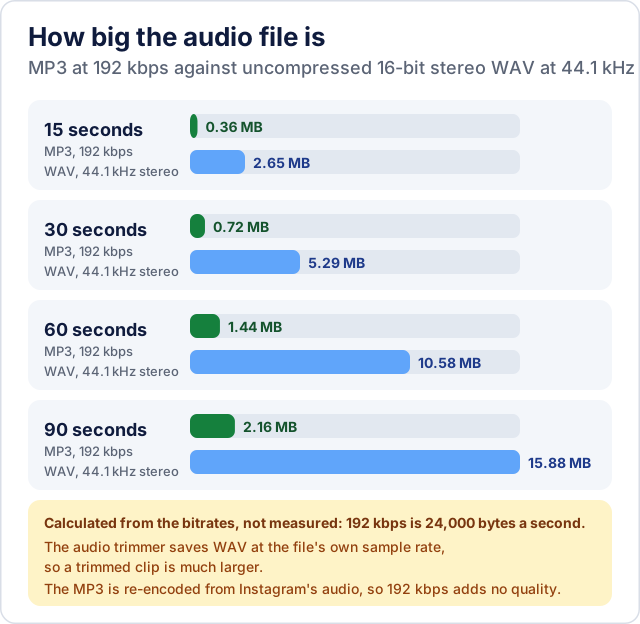
- A modest file size. At 192 kbps an MP3 uses 24,000 bytes a second, about 1.4 MB for a 60-second Reel.
The figures below are calculated from the bitrate, not measured on real files. They compare the MP3 with uncompressed 16-bit stereo WAV at 44.1 kHz, which is what you would get by saving the sound uncompressed. This matters if you plan to trim the file: the CoditTools Audio Trimmer accepts MP3 files but exports the trimmed clip as WAV, which is much larger than the MP3 it came from.
Once you have an MP3, the BPM Detector estimates its tempo between 60 and 200 beats per minute, and the Audio Speed Changer changes its playback speed, with pitch shifting along with speed. Both work in your browser on a file you choose, so neither needs the Reel link again.
If the download does not work
The messages come from the tool, and each points to a cause:
- "This Instagram post or account is private and cannot be fetched." or "Instagram content not found..." The Reel is private or deleted, or the link is wrong. The tool reads only public Reels.
- "This is not a Reel URL..." You pasted a post or TV link. See the accepted links above.
- "Instagram temporarily restricted public access to this post. Please try again later." Instagram refused the request. Wait and try again.
- "MP3 conversion is unavailable right now - the audio was saved as an .m4a file instead." If the server cannot convert to MP3 but the Reel offered a separate audio stream, the tool delivers that audio as an
.m4afile and names it honestly instead of passing off another format as an MP3. - "MP3 conversion is temporarily unavailable. Please try again later." The server could not produce an MP3 and had no separate audio stream to offer. Try again later.
- "Download failed. The media link may have expired or is unavailable." The link the tool extracted stopped working. Starting again from Extract Reel Audio requests a fresh one.
No tool that reads Instagram can promise to work every time, because Instagram can change what it serves without notice. If a Reel that worked yesterday fails today, that is the likely reason, and trying later is the first thing to do.
Before you reuse a Reel's audio
A Reel being public means anyone can watch it. It does not mean the sound is free to download for any purpose or to post elsewhere. These are two primary sources on the question, and neither is legal advice:
- The U.S. Copyright Office's fair use FAQ says that uploading or downloading works protected by copyright without the owner's authority infringes the owner's exclusive rights of reproduction and/or distribution. The same page says that whether a use is fair depends on all the circumstances, that it has no fixed word count or percentage that is always allowed, and that in cases of doubt the Office recommends getting permission. It describes U.S. law; other countries differ.
- Meta's Music Guidelines (effective 26 March 2024, as shown on the page) say you remain solely responsible for the content you post or promote, and that using music for commercial or non-personal purposes is prohibited unless you have obtained appropriate licences.
Instagram's own Terms of Use apply as well and are not summarised here. Taken together, the sources suggest asking these questions before you reuse the file:
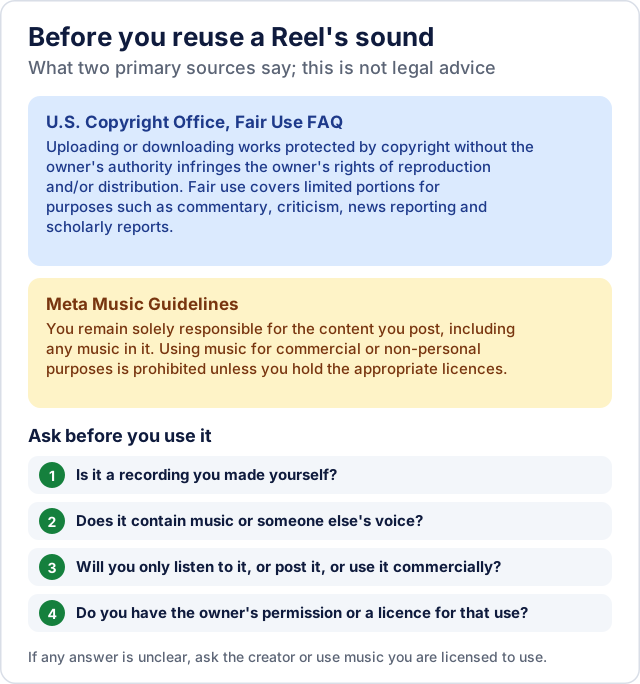
Your own Reel is the clearest case, but only for sound you made yourself: if it contains someone else's music or voice, that part is still theirs. If you are unsure, ask the creator for permission or use music you are licensed to use.
Try the tools mentioned in this post - all free, no account needed.
Runs in your browser. No watermarks. No file uploads to a server.
Browse all tools →