How to Convert Hex, Binary and Decimal by Hand: Worked Examples, Nibbles and Place-Value Shortcuts
Learn how to convert between hexadecimal, binary, and decimal by hand. Step-by-step place-value methods, 4-bit nibble groupings, division-by-2 shortcuts, and worked examples.

Converting numbers between hexadecimal, binary, and decimal is fundamentally an exercise in place value. Every number system uses positional notation where each column represents a power of its base. Because sixteen is an exact power of two (2⁴ = 16), hexadecimal serves as a compact, human-friendly shorthand for binary: one hex digit represents exactly four binary bits (a nibble). Decimal (base 10), by contrast, does not share a power-of-two relationship with binary or hex, which is why conversions involving decimal require arithmetic—either repeated division or summing powers of two.
Whether you are tracing memory addresses, debugging bitwise flags, prepping for a computer science exam, or optimizing network masks, knowing how to convert between these systems by hand lets you verify values instantly without relying on a screen. Every figure and conversion in this guide can be reproduced using the free, browser-based CoditTools Number System Converter, which uses native BigInt arithmetic so even values beyond 64 bits never suffer the silent rounding errors common in standard calculators.
The three core bases and positional place value
In any positional number system, a number is written as a sequence of digits. The true value of each digit is determined by multiplying the digit's symbol value by its column weight—the base raised to the power of its position from right to left, starting at position zero.

Decimal (Base 10)
Decimal uses ten symbols (0 through 9). Each position represents a power of 10: 10⁰ = 1, 10¹ = 10, 10² = 100, 10³ = 1,000, and so on. For example, the decimal number 342 means (3 × 100) + (4 × 10) + (2 × 1) = 300 + 40 + 2 = 342.
Binary (Base 2)
Binary uses only two symbols (0 and 1), representing electrical states (off and on). Each position represents an escalating power of 2: 2⁰ = 1, 2¹ = 2, 2² = 4, 2³ = 8, 2⁴ = 16, 2⁵ = 32, 2⁶ = 64, 2⁷ = 128. In binary, each digit is called a bit. Eight bits make up a byte, which can store integer values from 0 to 255 (2⁸ − 1).
Hexadecimal (Base 16)
Hexadecimal uses sixteen symbols: the digits 0 through 9, followed by the letters A through F to represent values 10 through 15 in a single character slot:
- A = 10
- B = 11
- C = 12
- D = 13
- E = 14
- F = 15
Column weights in hexadecimal scale rapidly by powers of 16: 16⁰ = 1, 16¹ = 16, 16² = 256, 16³ = 4,096, 16⁴ = 65,536. A two-digit hex number can express any value up to 255 (0xFF), matching the exact capacity of an 8-bit byte. This is why software developers, color systems (like hex codes in our Color Converter), and memory profilers use hexadecimal to represent raw bytes cleanly.
| Decimal | Binary (4-bit) | Hexadecimal | Octal |
|---|---|---|---|
| 0 | 0000 | 0 | 0 |
| 1 | 0001 | 1 | 1 |
| 2 | 0010 | 2 | 2 |
| 3 | 0011 | 3 | 3 |
| 4 | 0100 | 4 | 4 |
| 5 | 0101 | 5 | 5 |
| 6 | 0110 | 6 | 6 |
| 7 | 0111 | 7 | 7 |
| 8 | 1000 | 8 | 10 |
| 9 | 1001 | 9 | 11 |
| 10 | 1010 | A | 12 |
| 11 | 1011 | B | 13 |
| 12 | 1100 | C | 14 |
| 13 | 1101 | D | 15 |
| 14 | 1110 | E | 16 |
| 15 | 1111 | F | 17 |
Hex to binary: the 4-bit nibble shortcut
Converting from hex to binary is the fastest base conversion because you do not need division, multiplication, or complex arithmetic. Because 16 = 2⁴, each hexadecimal character represents a 4-bit binary sequence called a nibble. Within that 4-bit nibble, the four bits carry weights of 8, 4, 2, and 1.
To convert any hexadecimal string to binary by hand:
- Take each hex digit individually.
- Convert that digit into its 4-bit binary equivalent using the 8-4-2-1 rule.
- Join the 4-bit chunks together in the same order.

Worked Example 1: Convert 0x3B to binary
- Take the first digit
3: in 8-4-2-1 weights, 3 is 2 + 1. That gives binary0011. - Take the second digit
B: in hex, B equals 11. In 8-4-2-1 weights, 11 is 8 + 2 + 1. That gives binary1011. - Join them:
0011and1011produce00111011₂(or111011₂if dropping optional leading zeros). In decimal, this equals 32 + 16 + 8 + 2 + 1 = 59.
Worked Example 2: Convert 0x2A7F to binary
2=0010A(10) = 8 + 2 =10107= 4 + 2 + 1 =0111F(15) = 8 + 4 + 2 + 1 =1111- Concatenate:
0010 1010 0111 1111₂. That 16-bit binary string equals 10,879 in decimal.
Notice that inside a multi-byte sequence, you must never drop leading zeros within an internal nibble. For example, the 2 becomes 0010 and the 7 becomes 0111. Dropping the internal zero from 0111 would shift the remaining bits left and corrupt the entire value.
Binary to hexadecimal: grouping from the right
Converting from binary to hexadecimal reverses the nibble process, but there is one rule that catches people out: always group bits into sets of four starting from the right (least significant bit).
The steps:
- Start at the rightmost bit and count four bits to form the first nibble.
- Move left and group the next four bits.
- If the leftmost group has fewer than four bits, pad it with leading zeros until it has four bits.
- Convert each 4-bit group into its single hex digit (0–9 or A–F).
Worked Example 1: Convert 11010110₂ to hex
- Split into 4-bit groups from the right:
1101and0110. - First group
1101: 8 + 4 + 0 + 1 = 13, which is hex D. - Second group
0110: 0 + 4 + 2 + 0 = 6, which is hex 6. - Result:
0xD6. In decimal, (13 × 16) + 6 = 208 + 6 = 214.
Worked Example 2: Convert 10110₂ to hex (5 bits)
- Grouping from the right gives
0110on the right, leaving just a single bit1on the left. - Pad the left group with three leading zeros:
0001. - Now evaluate both nibbles:
0001= 1, and0110= 6. - Result:
0x16. In decimal, (1 × 16) + 6 = 22. Check: 16 + 4 + 2 = 22.
If you had grouped from the left instead of the right, you would have split 10110 into 1011 (B) and 0 (0), giving 0xB0 (decimal 176)—a massive error. Grouping from the right preserves the column weights of 1, 2, 4, and 8 for every position.
Binary to decimal by hand
To convert an unsigned binary number to decimal without a calculator, you have two reliable methods: summing active powers of 2, or the doubling algorithm (Horner's rule).
Method 1: Summing powers of 2 (Positional weight)
Write the power-of-two weights (1, 2, 4, 8, 16, 32, 64, 128...) directly above each bit, from right to left. Then add only the numbers that sit above a 1 bit.
For example, to convert 110101₂ to decimal:
| Bit position | 5 | 4 | 3 | 2 | 1 | 0 |
|---|---|---|---|---|---|---|
| Power of 2 | 2⁵ = 32 | 2⁴ = 16 | 2³ = 8 | 2² = 4 | 2¹ = 2 | 2⁰ = 1 |
| Binary bit | 1 | 1 | 0 | 1 | 0 | 1 |
| Contribution | 32 | 16 | 0 | 4 | 0 | 1 |
Summing the active values: 32 + 16 + 4 + 1 = 53. Therefore, 110101₂ = 53₁₀.
Method 2: The doubling algorithm (Horner's rule)
If you have a longer binary string and do not want to calculate large powers like 512, 1024, or 2048, the doubling method works from left to right using simple mental arithmetic: start at 0, double your running total, and add the current bit.
Let's convert the same binary number 110101₂ using doubling:
- Start with 0. Double it (0) and add the first bit (1) → 1.
- Double 1 (2) and add the next bit (1) → 3.
- Double 3 (6) and add the next bit (0) → 6.
- Double 6 (12) and add the next bit (1) → 13.
- Double 13 (26) and add the next bit (0) → 26.
- Double 26 (52) and add the final bit (1) → 53.
Both methods give 53. The doubling method is particularly convenient when converting paper scratchpad values where you do not have a powers-of-two lookup table handy.
Decimal to binary by hand
Converting from decimal to binary by hand can be performed with two techniques: repeated division by 2 (the formal method) or subtracting descending powers of 2 (the mental shortcut).
Method 1: Repeated division by 2
Divide the decimal number by 2 using integer division. Write down the quotient and the remainder (which will always be either 0 or 1). Take the quotient, divide by 2 again, and record the new remainder. Repeat until the quotient reaches 0. Finally, read the remainders from bottom to top.
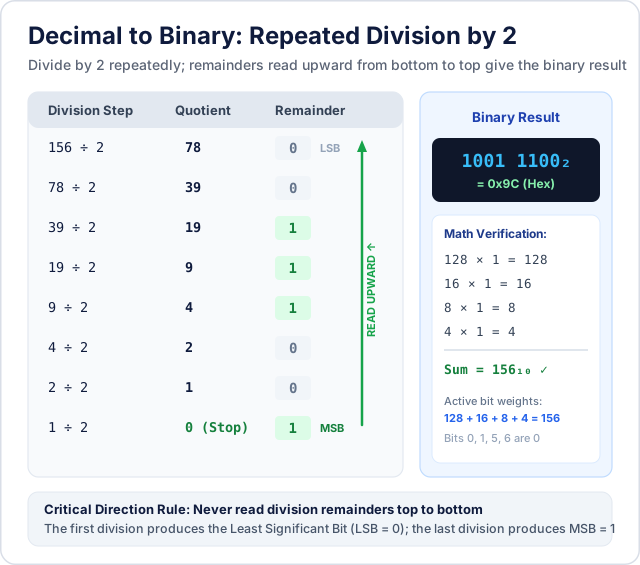
Here is the full division sequence for decimal 156:
- 156 ÷ 2 = 78, remainder 0 (LSB — rightmost bit)
- 78 ÷ 2 = 39, remainder 0
- 39 ÷ 2 = 19, remainder 1
- 19 ÷ 2 = 9, remainder 1
- 9 ÷ 2 = 4, remainder 1
- 4 ÷ 2 = 2, remainder 0
- 2 ÷ 2 = 1, remainder 0
- 1 ÷ 2 = 0, remainder 1 (MSB — leftmost bit, stop here)
Reading the remainders from the last division (bottom) to the first (top): 1001 1100₂. We can check our work by summing the active powers of two: 128 + 16 + 8 + 4 = 156.
Method 2: Subtracting descending powers of 2
For numbers under 1,000, subtracting powers of 2 is often faster than eight successive division steps:
- Find the largest power of 2 that is less than or equal to your number. Write a
1for that power. - Subtract that power from your number to get the remainder.
- Move down to the next lower power of 2. If it fits into the remainder, write a
1and subtract it. If it does not fit, write a0and keep the remainder. - Repeat down to 2⁰ = 1.
Testing on 156:
- Powers of two: 128, 64, 32, 16, 8, 4, 2, 1.
- Does 128 fit? Yes. 156 − 128 = 28. (Bit = 1)
- Does 64 fit in 28? No. (Bit = 0)
- Does 32 fit in 28? No. (Bit = 0)
- Does 16 fit in 28? Yes. 28 − 16 = 12. (Bit = 1)
- Does 8 fit in 12? Yes. 12 − 8 = 4. (Bit = 1)
- Does 4 fit in 4? Yes. 4 − 4 = 0. (Bit = 1)
- Does 2 fit in 0? No. (Bit = 0)
- Does 1 fit in 0? No. (Bit = 0)
Result: 10011100₂. Identical result, achieved in a few mental steps.
Hexadecimal to decimal conversion
To convert hexadecimal to decimal directly, multiply each hex digit by its corresponding power of 16 (16⁰ = 1, 16¹ = 16, 16² = 256, 16³ = 4096), remembering to substitute the values 10 through 15 for letters A through F.
Worked Example: Convert 0x1E4 to decimal
- Digit in 16² position:
1→ 1 × 256 = 256 - Digit in 16¹ position:
E(14) → 14 × 16 = 224 - Digit in 16⁰ position:
4→ 4 × 1 = 4 - Add the components: 256 + 224 + 4 = 484.
- Result:
0x1E4= 484₁₀.
The two-step shortcut via binary
If multiplying by 256 or 4096 in your head feels error-prone, convert hex to binary first, then convert binary to decimal. For example, to convert 0x2F:
- Convert to binary:
2=0010,F=1111→00101111₂. - Convert binary to decimal: 32 + 8 + 4 + 2 + 1 = 47.
- Direct verification: (2 × 16) + 15 = 32 + 15 = 47. Both methods yield 47.
Decimal to hexadecimal conversion
Converting decimal to hexadecimal can be done with repeated division by 16 or by routing through binary.
Method 1: Repeated division by 16
Divide the decimal number by 16. Record the remainder, and if the remainder is between 10 and 15, convert it to its hex letter (10 = A, 11 = B, 12 = C, 13 = D, 14 = E, 15 = F). Repeat with the quotient until it reaches 0, then read remainders from bottom to top.
Let's convert decimal 750 to hexadecimal:
- 750 ÷ 16 = 46, remainder 14 (which is E)
- 46 ÷ 16 = 2, remainder 14 (which is E)
- 2 ÷ 16 = 0, remainder 2 (which is 2, stop here)
Reading bottom to top gives 0x2EE. Verifying: (2 × 256) + (14 × 16) + (14 × 1) = 512 + 224 + 14 = 750.
Method 2: Decimal to binary, then binary to hex
For programmers, converting decimal to binary first (using powers of two) and then grouping into 4-bit nibbles is often simpler than doing multi-digit long division by 16 on paper.
Common mistakes in manual base conversions
Even experienced engineers make simple mechanical mistakes when working on scratch paper. Watch out for these five frequent traps:
- Grouping binary bits from left to right instead of right to left. When converting binary to hex, grouping from the left corrupts the place values unless the bit count happens to be an exact multiple of 4. Always anchor your groups at the rightmost bit.
- Miscounting the letters A through F. A common slip is treating A as 1 or 11. Remember: 0–9 take digits, so A is 10, B is 11, C is 12, D is 13, E is 14, and F is 15.
- Reading division remainders in the wrong direction. When using repeated division, the first remainder you calculate is the least significant bit (on the far right). The last remainder is the most significant bit (on the far left). Reading top to bottom produces the reverse number.
- Dropping intermediate zero nibbles. When converting a multi-digit hex number like
0x40Ato binary, the zero must be written as four zeros:0100 0000 1010. Writing0100 0 1010or omitting it entirely collapses the bit width and changes the value completely. - Confusing byte boundaries. An 8-bit byte needs 2 hex digits; a 16-bit word needs 4 hex digits; a 32-bit integer needs 8 hex digits; a 64-bit integer needs 16 hex digits. If your hex string has an odd number of characters and represents a full byte sequence, add a leading zero (e.g.
0x7Finstead of0x7fmissing its upper nibble).
Integer vs. fractional and signed representations
All the algorithms covered above handle unsigned non-negative integers. When working with real-world computer systems, you will encounter two other variations:
Fractional conversions (Radix points)
In base 10, digits after the decimal point represent negative powers of 10 (10⁻¹ = 0.1, 10⁻² = 0.01). In binary, positions after the radix point represent negative powers of 2: 2⁻¹ = 0.5, 2⁻² = 0.25, 2⁻³ = 0.125, 2⁻⁴ = 0.0625. For example, 10.11₂ in binary equals 2 + 0.5 + 0.25 = 2.75 in decimal. In hexadecimal, positions after the point represent powers of 16⁻¹ = 1/16 = 0.0625. Most simple manual base converters focus on whole integers; fractional numbers in modern processors are encoded using the IEEE-754 floating-point standard with dedicated sign, exponent, and mantissa fields.
Signed integers and two's complement
Negative numbers in hardware are not stored with a minus sign; they use two's complement notation. In an 8-bit signed integer, the leftmost bit (bit 7) represents −128 instead of +128. For example, 0xFF as an unsigned byte is 255, but as a signed 8-bit two's complement integer it represents −1. If you are converting values for low-level assembly or C code, verify whether the target field is signed or unsigned before translating hex to decimal.
When to calculate by hand vs. free online number base converters
Knowing when to compute by hand versus when to use an online conversion utility saves time and prevents errors.

When manual calculation is best
- Quick hex-to-binary lookups: Substituting 4-bit nibbles for
0x3For0x80takes two seconds on paper or in your head—faster than opening a browser tab. - Inspecting bitmasks: Checking which single flag is set in an 8-bit or 16-bit configuration register (e.g.
0x04= bit 2). - Academic and interview settings: University computer science exams and technical interviews test whether you understand the mechanics of place value and radix arithmetic.
When an online base converter is essential
- Large integers beyond 64 bits: Manually converting 128-bit UUIDs, 256-bit cryptographic keys (from our Hash Generator), or blockchain contract addresses would take hundreds of error-prone division steps.
- Simultaneous multi-base conversion: When you need to see Hex, Decimal, Binary, and Octal aligned side by side in real time.
- Avoiding JavaScript safe integer rounding: Many generic web calculators use standard JavaScript numbers (
parseInt(str, 16)). In JavaScript, theNumbertype is an IEEE-754 64-bit float, which only maintains safe integer precision up to 2⁵³ − 1 (9,007,199,254,740,991). Values larger than 53 bits silently round off the least significant digits. The CoditTools Number System Converter uses nativeBigIntarithmetic, guaranteeing exact integer conversion for numbers of any length with zero precision loss. - Checking byte and bit allocations: Verifying how many total bits and memory bytes a number requires for data structure sizing.
Using the CoditTools Number System Converter
The CoditTools Number System Converter is a free, browser-based utility designed for developers, students, and engineers. It runs entirely inside your browser using client-side JavaScript, meaning your data never leaves your device.
Here is what the tool provides based on its actual implementation:
- Live bi-directional updates: You can type in any field—Hexadecimal (base 16), Decimal (base 10), Binary (base 2), or Octal (base 8)—and all other three fields update instantaneously as you type.
- Automatic prefix recognition: The parser handles common programming prefixes:
0xfor hex,0bfor binary, and0ofor octal. You can paste0xFFdirectly into the hex field without an error. - Arbitrary-precision BigInt engine: Because conversions are routed through native
BigInt, you can convert 100-digit decimal numbers or 256-bit binary keys without rounding. - Bit Info dashboard: Whenever a valid number is entered, the tool displays the exact minimum bit length required to represent the number and the total bytes it rounds up to (
Math.ceil(bits / 8)). - Quick presets: One-click preset buttons for common benchmarks like
42,255 (FF),256, and1024for quick testing. - One-click copy: Individual copy buttons on each base field with visual toast confirmations.
For related utilities, see our Binary to Text Converter for decoding binary streams into ASCII strings, our Color Converter for translating 6-digit hex color codes into RGB and HSL, and our guide on how to format and validate JSON to learn how parsers handle numeric precision in data payloads.
Frequently asked questions
What is the fastest way to convert hex to binary?
The fastest way is the 4-bit nibble substitution method. Replace each hex digit with its 4-bit binary equivalent (0 = 0000, 1 = 0001, ..., F = 1111) and join them together. No multiplication or division is required.
How can I convert binary to decimal without a calculator?
Use either positional weights or the doubling algorithm. With positional weights, write 1, 2, 4, 8, 16, 32, 64... from right to left above each bit and sum the numbers that sit above a 1. With the doubling algorithm, start at 0, double your running total, and add the next bit from left to right.
Why does hexadecimal use letters A through F?
In positional notation, each column must contain exactly one symbol. Because base 16 requires sixteen distinct digit values, the digits 0 through 9 represent values 0 to 9, and the letters A, B, C, D, E, and F represent values 10, 11, 12, 13, 14, and 15 respectively.
What is a nibble in computer science?
A nibble (sometimes spelled nybble) is a four-bit aggregation, or half of an eight-bit byte. Since 2⁴ = 16, exactly one hexadecimal character corresponds to one nibble, making hex the standard notation for displaying bytes.
Why do some online number converters give wrong answers for large binary numbers?
Most basic web converters rely on JavaScript's built-in Number type or parseInt(), which are limited by the IEEE-754 64-bit float format. This format can only represent integers exactly up to 2⁵³ − 1 (9,007,199,254,740,991). Numbers larger than 53 bits silently round off the lowest digits. Dedicated tools like the CoditTools converter use BigInt to handle numbers of arbitrary size without loss of precision.
What is a free alternative to paid number conversion software?
The CoditTools Number System Converter is completely free, runs 100% in your browser, requires no account or installation, and supports real-time arbitrary-precision conversion across binary, octal, decimal, and hexadecimal with bit-length analysis.
Try the tools mentioned in this post - all free, no account needed.
Runs in your browser. No watermarks. No file uploads to a server.
Browse developer tools →