What Is a File Checksum? How to Generate and Verify MD5, SHA-1, and SHA-256 Hashes
Learn what file checksums are, how cryptographic hashes work, and how to verify MD5, SHA-1, and SHA-256 hashes to detect file corruption, verify software downloads, and protect data integrity.

Whenever you download an operating system installer, an open-source development library, or a critical firmware update, you have likely noticed a string of hexadecimal letters and numbers listed next to the download button labelled "SHA-256 Checksum," "MD5 Fingerprint," or "Hash Value." For many users, these strings appear as impenetrable technical jargon. Yet in modern computing and software distribution, checksums represent the single most dependable mechanism for answering two vital questions: Did my download arrive intact without transmission errors? and Has this file been altered or tampered with by a malicious third party?
Whether you are a developer verifying software packages, a system administrator confirming server disk images, or a privacy-conscious user auditing downloaded media, understanding how cryptographic hashes operate is an indispensable foundational skill. In this comprehensive guide, we will break down the mathematical principles behind file checksums, compare the most widely used hashing algorithms—including MD5, SHA-1, and SHA-256—explain the difference between accidental corruption and malicious tampering, provide step-by-step verification commands across Windows, macOS, and Linux, and demonstrate how to check file hashes instantly in your browser using the CoditTools Hash Generator.
What Is a Checksum and How Does Cryptographic Hashing Work?
At its core, a checksum (or hash value) is a fixed-length string of characters produced by feeding digital data—such as a plain text string, an executable installer, a multi-gigabyte ISO disk image, or an archival ZIP folder—through a deterministic mathematical algorithm known as a hash function. Regardless of whether the input file is a three-word text snippet or a 50-gigabyte database backup, a specific hash function always outputs an alphanumeric digest of the exact same character length.
Unlike encryption algorithms such as AES or RSA, which are two-way operations designed to scramble data so it can later be decrypted with a private key, cryptographic hash functions are strictly one-way functions. You can easily compute a hash from an input, but it is mathematically impossible to reverse the process and reconstruct the original file from the resulting hash digest alone.
The Five Fundamental Properties of Cryptographic Hash Functions
To serve as a dependable integrity mechanism, an algorithm must exhibit five mathematical properties:
- Strict Determinism: The same exact input data will always yield the exact same hash output, every single time, across any hardware architecture or operating system. If you compute the SHA-256 hash of a file on a Linux server and your colleague computes it on a Windows laptop, both values will match character for character.
- High Computational Efficiency: Computing the hash digest of an input must be fast and computationally straightforward, allowing system utilities to process gigabytes of data in seconds.
- Pre-Image Resistance (One-Way Property): Given an arbitrary hash digest
H, it should be computationally infeasible to determine the original input messageMsuch thathash(M) = H. - The Avalanche Effect: Even the slightest conceivable modification to the input data—such as changing a single capitalized letter to lowercase, adding an invisible whitespace character, or flipping one single binary bit in a multi-gigabyte file—must radically alter the resulting hash. The output will look completely uncorrelated with the previous digest.
- Collision Resistance: It must be computationally impossible to find two distinct inputs,
AandB, that produce the exact same output digest (hash(A) = hash(B)). When two distinct inputs produce identical hashes, a collision occurs, which compromises the cryptographic integrity of that algorithm.
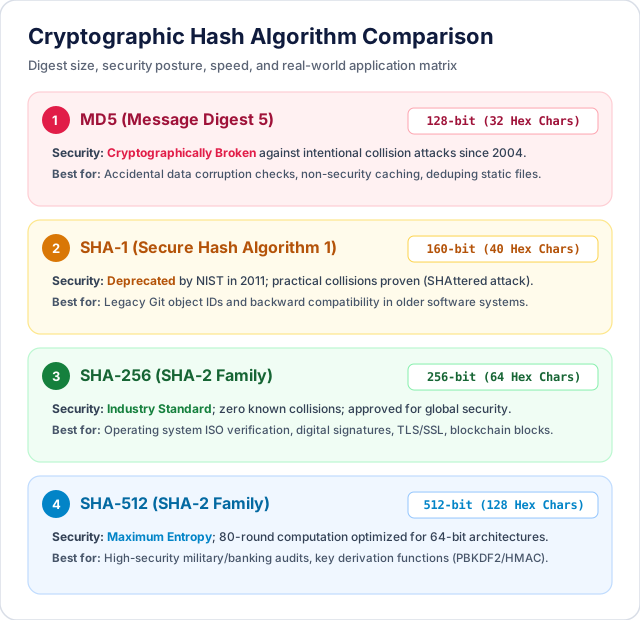
MD5 vs SHA-1 vs SHA-256: Algorithm Differences and Security Status
Over the past four decades, computer scientists have developed numerous hashing algorithms. When using an md5 hash checker or reviewing security bulletins, you will most frequently encounter algorithms from two primary families: the MD (Message Digest) family and the SHA (Secure Hash Algorithm) family.
| Algorithm | Digest Length | Hex Characters | Collision Resistance | Recommended Modern Use Case |
|---|---|---|---|---|
| MD5 (Message Digest 5) | 128 bits | 32 chars | Broken (2004) | Casual transmission check, non-security duplicate file finding |
| SHA-1 (Secure Hash 1) | 160 bits | 40 chars | Broken (2017) | Legacy Git commit IDs, deprecated for digital certificates |
| SHA-256 (SHA-2 Family) | 256 bits | 64 chars | Current Gold Standard | Software downloads, SSL/TLS certificates, blockchain verification |
| SHA-512 (SHA-2 Family) | 512 bits | 128 chars | Ultra Secure | High-security government archives, password derivation (PBKDF2) |
1. MD5 (Message Digest 5): 128-Bit Digest
Designed by cryptographer Ronald Rivest in 1991, MD5 outputs a 32-character hexadecimal string (128 bits). For over a decade, MD5 was the dominant internet standard for checksum verification and password storage. However, in 2004, research teams demonstrated practical collision attacks against MD5, proving that attackers could generate two completely different documents that shared identical MD5 hashes. By 2012, cyber-threat actors leveraged MD5 collisions in the wild during the infamous Flame cyberattack to forge fraudulent Microsoft digital code-signing certificates.
Crucial Rule: MD5 must never be used for password hashing, digital signatures, or security-sensitive authentication. However, because MD5 is computationally lightweight and universally supported, it remains widely used for verifying whether a downloaded ISO or ZIP archive suffered accidental network packet loss during transfer.
2. SHA-1 (Secure Hash Algorithm 1): 160-Bit Digest
Developed by the United States National Security Agency (NSA) and published by NIST in 1995, SHA-1 produces a 40-character hexadecimal string (160 bits). It replaced MD5 across operating systems and formed the backbone of SSL certificates and Git version control repositories. However, theoretical vulnerabilities surfaced in 2005, culminating in 2017 when researchers from Google and CWI Amsterdam produced the world's first practical SHA-1 collision, known as the "SHAttered" attack (creating two distinct PDF documents with identical SHA-1 hashes). Consequently, all modern web browsers reject SHA-1 SSL certificates, and Git has transitioned toward SHA-256 for commit identification.
3. SHA-256 (SHA-2 Family): 256-Bit Digest
Also designed by the NSA and standardized by NIST, the SHA-2 family includes SHA-224, SHA-256, SHA-384, and SHA-512. The 256-bit variant, SHA-256, generates a 64-character hexadecimal digest. To date, there is no known practical collision attack against SHA-256. It is the reigning industry standard across modern software distribution (such as Ubuntu, Debian, Python, and Node.js release mirrors), SSL/TLS web certificates, secure code signing, and decentralized blockchain protocols like Bitcoin.
File Integrity vs Malicious Tampering: The Two Threat Models
To use checksums effectively, you must understand the two distinct scenarios where file verification comes into play:

Scenario A: Accidental Network Corruption
When downloading large files over unstable Wi-Fi, satellite connections, or congested cellular networks, occasional dropped TCP packets or failing storage media can introduce silent bit rot. The downloaded file might appear to have the correct file size, but running the installer fails with cryptic errors such as "Archive corrupted" or "Syntax error in binary stream." In this scenario, running any hash check—even an MD5 hash checker—will immediately alert you that the local file does not match the publisher's published checksum, saving you hours of troubleshooting.
Scenario B: Man-in-the-Middle (MitM) Tampering and Supply Chain Attacks
If an attacker compromises an unencrypted download mirror or intercepts your network traffic, they can replace a legitimate software package with a trojanized version embedding malware. In this hostile threat model, checking an MD5 hash is insufficient if the attacker can forge a collision. Furthermore, you must ensure that you obtain the expected SHA-256 checksum from a secure, authenticated channel (such as an HTTPS encrypted website or a GPG-signed text file), rather than an unverified HTTP mirror that the attacker might have also modified.
How to Verify File Checksums on Windows, macOS, and Linux
Every major operating system includes built-in command-line utilities to calculate file hashes without requiring any third-party software installation.
1. Windows (PowerShell)
On Windows 10 and Windows 11, open PowerShell and utilize the built-in Get-FileHash cmdlet. By default, it computes the SHA-256 hash:
# Compute default SHA-256 hash
Get-FileHash -Path "C:\Users\User\Downloads\installer.iso"

# Compute an MD5 checksum specifically
Get-FileHash -Path "C:\Users\User\Downloads\installer.iso" -Algorithm MD5

# Compute a SHA-512 checksum
Get-FileHash -Path "C:\Users\User\Downloads\installer.iso" -Algorithm SHA512
PowerShell outputs an organized table listing the algorithm, the uppercase hexadecimal hash, and the file path. You can verify whether it matches the author's published hash by using a simple PowerShell comparison:
$hash = (Get-FileHash -Path "installer.iso").Hash
$expected = "E3B0C44298FC1C149AFBF4C8996FB92427AE41E4649B934CA495991B7852B855"
$hash -eq $expected
# Returns True if identical, False if corrupted
2. macOS (Terminal)
On Apple macOS, open Terminal and use the native BSD commands shasum and md5:
# Generate SHA-256 checksum
shasum -a 256 installer.dmg

# Generate SHA-1 checksum
shasum -a 1 installer.dmg

# Generate legacy MD5 checksum
md5 installer.dmg
3. Linux (GNU Coreutils)
All mainstream Linux distributions (Ubuntu, Fedora, Arch, Debian) come pre-packaged with GNU Coreutils hashing binaries:
# Generate SHA-256 hash
sha256sum ubuntu-24.04-desktop-amd64.iso

# Automate verification against an official SHA256SUMS file
sha256sum --check SHA256SUMS

# Generate MD5 hash
md5sum archive.tar.gz
Instant Verification in Your Browser with CoditTools
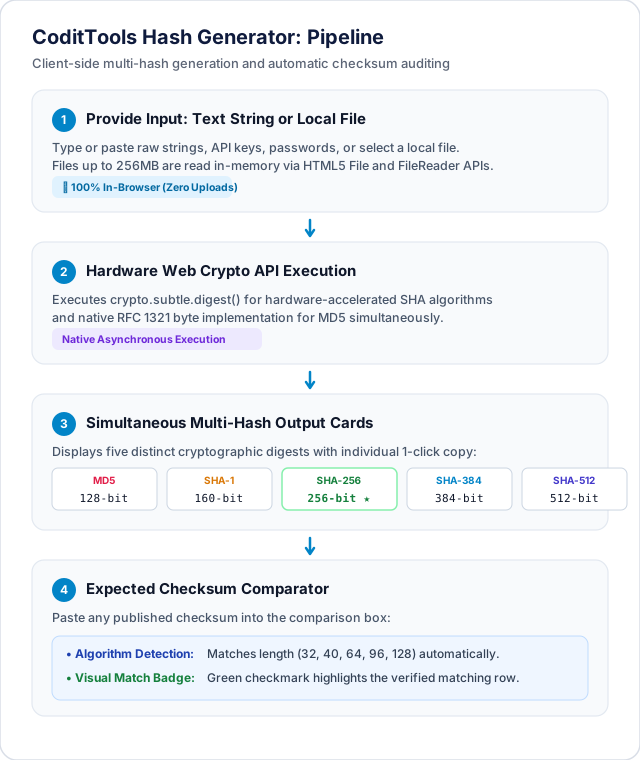
While terminal commands are powerful, navigating terminal paths, remembering command flags, and visually scanning 64-character hex strings character-by-character can be tedious and prone to human error. That is why we developed the browser-based CoditTools Hash Generator.
Key Features of the CoditTools Hash Generator:
- 100% Client-Side Privacy: Your text strings and files are processed strictly inside your web browser using modern Web Cryptography API standards and in-memory WebAssembly. Not a single byte of your file or text is ever uploaded to our servers or stored in any database.
- Simultaneous Multi-Algorithm Generation: Rather than running separate CLI commands for each hash, our tool calculates MD5, SHA-1, SHA-256, SHA-384, and SHA-512 hashes simultaneously in real time.
- Instant Checksum Comparator: Paste the publisher's expected hash into the comparator box. The tool automatically trims whitespace, ignores case discrepancies (uppercase vs lowercase hex), and displays an unequivocal green "Checksum Matched" confirmation or a red "Mismatch Detected" alert.
- Support for Large In-Browser Files: Stream files up to 256MB directly through browser memory for instantaneous checksum verification without installing command-line utilities.
Common Checksum Pitfalls and How to Avoid Them
When generating and verifying hashes, users frequently encounter false mismatches due to minor technical oversights. Keep these four guidelines in mind:
- Windows vs Unix Line Endings (CRLF vs LF): If you are hashing raw text files or source code, Windows editors save line breaks as Carriage Return + Line Feed (
\r\n), while Linux and macOS save them as Line Feed (\n). Because every byte matters, hashing the exact same visible code snippet on Windows and Linux will produce completely different hashes unless line endings are normalized. - Hexadecimal Case Sensitivity: Hash strings are hexadecimal representations of binary data. The string
a1b2c3is mathematically identical toA1B2C3. Some tools output lowercase letters while others output uppercase. Ensure your verification process uses case-insensitive string comparison. - Trailing Whitespace and Inadvertent Spaces: Copying a hash string from a web browser frequently captures an extra leading or trailing space character. If you run a direct string comparison without stripping whitespace, the check will fail.
- Comparing Hashes from Compressed Archives: If a publisher provides the checksum for an uncompressed disk image (
disk.img), verifying the hash of the downloaded compressed ZIP folder (disk.zip) will yield a false mismatch. Always verify whether the published checksum applies to the archive container or the extracted contents.
Frequently Asked Questions About File Checksums
Can two different files ever produce the same SHA-256 hash?
Theoretically, yes; because there are an infinite number of possible files and only 2256 possible SHA-256 hash combinations, the Pigeonhole Principle dictates that collisions must exist mathematically. However, 2256 is approximately 1.15 × 1077, a number comparable to the total number of atoms in the observable universe. The probability of two different legitimate files accidentally colliding in SHA-256 is so vanishingly small that it is considered practically impossible in modern computing.
Can I reverse a hash to recover the original password or file?
No. Cryptographic hashes are one-way lossy mathematical compressions. An SHA-256 hash is always exactly 256 bits (32 bytes) long, whether the input was a single character or a 4-gigabyte movie. It is physically impossible to reconstruct a multi-gigabyte file from 32 bytes of information. When security auditors "crack" password hashes, they do not reverse the mathematical formula; instead, they generate billions of candidate guesses from wordlists (a brute-force or dictionary attack) and check if any guess produces an identical hash digest.
Is MD5 still safe to use if I only want to check a download?
Yes, for checking accidental transmission errors (such as interrupted downloads or bad disk sectors), MD5 is still perfectly adequate. The mathematical weaknesses in MD5 involve deliberate, carefully engineered cryptographic collisions created by sophisticated attackers. Accidental network corruption cannot produce an artificial collision; it will simply garble the data and cause the MD5 checksum to fail.
What is the difference between a hash and an HMAC?
A standard hash takes only an input message and outputs a digest. An HMAC (Hash-based Message Authentication Code) combines the input message with a secret cryptographic key known only to the sender and recipient. HMAC ensures both integrity (the message was not modified) and authenticity (the message was created by someone possessing the shared secret key).
Summary and Next Steps
File checksums provide an airtight mathematical safeguard against silent data corruption and unauthorized tampering. For general file transfers, comparing an MD5 or SHA-256 digest gives you immediate certainty that every byte arrived intact. For high-security environments and cryptographic verification, always rely on SHA-256 or SHA-512 digests obtained from secure HTTPS or GPG-signed sources.
Whenever you need to verify a download, calculate text digests, or inspect data fingerprints without opening a terminal, bookmark the free CoditTools Hash Generator. To explore complementary utilities for developer workflows, string manipulation, and encoding, explore our UUID Generator, Base64 Encoder / Decoder, and our complete suite of Developer Tools.
Try the tools mentioned in this post - all free, no account needed.
Runs in your browser. No watermarks. No file uploads to a server.
Browse developer tools →