What Is Tap Tempo? How to Calculate BPM from Real-Time Taps and Song Audio
Discover what tap tempo is, the exact formula to calculate Beats Per Minute (BPM) from tap intervals, and how modern audio peak analysis detects track tempos.

Whether you are a DJ attempting to beatmatch two disparate tracks seamlessly in a live set, a music producer dialing in the millisecond delay time on a guitar pedal, a drummer trying to lock into an exact rhythm, or an athlete curating a high-cadence running playlist, tempo is the fundamental heartbeat of sound. In music theory and modern audio engineering, tempo is universally quantified as Beats Per Minute (BPM). Yet when you hear a new song on the radio, listen to a live band, or brainstorm a fresh melody, how do you determine its exact numerical tempo?
This is where Tap Tempo comes in. Originally invented as a hardware feature on vintage digital delay processors and drum machines, tap tempo enables musicians and sound engineers to calculate the exact tempo of any rhythm simply by tapping along to the beat on a button, key, or screen. In this comprehensive guide, we will explore the mathematical formulas that govern tap tempo calculation, explain how moving averages eliminate human timing inaccuracies, outline the standard BPM spectrum across modern musical genres, examine how digital audio workstations (DAWs) synchronize hardware effects, and explore how automated peak detection tools like the CoditTools BPM Detector analyze entire audio files in your browser.
What Is BPM and What Is Tap Tempo?
In music, BPM (Beats Per Minute) measures the frequency of the underlying musical pulse. A tempo of 60 BPM corresponds exactly to one beat per second (1.0 Hz), identical to the ticking of a standard clock. A tempo of 120 BPM means two beats occur every second, or 120 quarter-note pulses every sixty seconds.
Tap Tempo is an interactive measurement method where a user rhythmically taps a sensor (such as a keyboard spacebar, a footswitch pedal, or a touchscreen button) in synchrony with a perceived musical beat. An internal microprocessor or software timer records the exact timestamps of each successive tap, calculates the millisecond intervals between them, and translates those elapsed intervals into an accurate BPM reading.

The Mathematical Formula Behind Tap Tempo Calculation
The mathematical relationship between the time interval between two beats and the resulting tempo is an inverse proportional formula:
Where Δtms represents the time interval between two consecutive beats in milliseconds.
Alternatively, if your interval is measured in seconds:
Worked Numerical Examples:
- Example 1: If you tap once every 500 milliseconds (0.50 seconds):
BPM = 60,000 / 500 = 120 BPM(Standard House / Pop tempo). - Example 2: If you tap once every 750 milliseconds (0.75 seconds):
BPM = 60,000 / 750 = 80 BPM(Laid-back Hip-Hop / Downtempo). - Example 3: If you tap once every 352.94 milliseconds:
BPM = 60,000 / 352.94 ≈ 170 BPM(Drum & Bass / Upbeat Rock).
Why Multi-Tap Moving Averages Are Essential
Human neuromuscular motor control is not a mechanical quartz clock. Even professional drummers and metronome-trained concert pianists exhibit a natural "jitter" of ±10 to 30 milliseconds when tapping along to a song. If a tap tempo calculator only evaluated the interval between the two most recent taps, the displayed BPM would wildly jump between 116 BPM and 124 BPM on every stroke.
To eliminate this human variance and stabilize the calculation, high-quality tap tempo engines utilize an N-tap moving average (typically averaging the most recent 4 to 8 tap intervals):
BPM = 60,000 / Δtavg
Furthermore, intelligent tap engines implement a timeout threshold (typically 2,000 to 3,000 milliseconds of inactivity). If you stop tapping for more than two seconds, the engine assumes you are starting a new measurement and resets the interval accumulator.
The Musical Tempo Spectrum: From Classical Markings to Modern Genres
Understanding BPM values provides an immediate musical shorthand for groove, energy, and physical dancefloor momentum. Modern music spans a well-defined tempo spectrum:

| BPM Range | Classical Italian Term | Contemporary Musical Genres | Physical Sensation / Energy Level |
|---|---|---|---|
| 40 – 60 BPM | Largo / Lento | Ambient, Cinematic Ballads, Funeral Marches | Deep relaxation, stillness, heavy weight |
| 66 – 76 BPM | Adagio | R&B Ballads, Reggae Dub, Slow Pop | Sensual groove, deliberate pacing |
| 80 – 95 BPM | Andante | Classic Boom-Bap Hip-Hop, Modern Trap (Half-time) | Walking pace, head-nodding rhythm |
| 100 – 115 BPM | Moderato | Funk, Nu-Disco, Mid-tempo Synthwave | Bouncy, rhythmic, easy foot-tapping |
| 120 – 130 BPM | Allegro | House, Tech-House, Electro Pop, Disco | Universal dancefloor sweet spot (jogging cadence) |
| 138 – 145 BPM | Vivace | Trance, Dubstep, UK Garage, Hard Techno | High adrenaline, peak-time rave energy |
| 160 – 180 BPM | Presto | Drum & Bass, Jungle, Punk Rock, Thrash Metal | Frenetic speed, rapid sprinting cadence |
Practical Uses: Live Sound, FX Synced Delays, and Production
Why do audio engineers and musicians obsess over exact BPM values? There are four major production workflows where precise tempo tracking is indispensable:
1. Synchronizing Time-Based Audio Effects (Delay & Reverb)
If a guitarist plays a solo in a 120 BPM song and engages a digital delay pedal set to an arbitrary 450-millisecond delay time, the repeating echoes will rhythmically clash with the drummer's snare, turning the mix into an unintelligible sonic soup. However, if the pedal knows the song is 120 BPM, a quarter-note delay corresponds to exactly 500 ms, an eighth-note delay is 250 ms, and a popular "dotted eighth-note" echo (the signature rhythmic sound of U2's The Edge and modern worship music) is calculated as:
At 120 BPM: (500 ms) × 0.75 = 375 ms.
By tapping a footswitch twice on stage, guitarists and keyboardists instantly lock their echo repeats into perfect rhythmic lockstep with the drummer.
2. Seamless DJ Transitioning and Harmonic Mixing
Club DJs use BPM tracking to determine whether two tracks can be mixed without trainwrecking. Mixing a 124 BPM house track into a 128 BPM track requires only a subtle +3.2% pitch adjustment. Conversely, attempting to blend a 90 BPM hip-hop groove into a 140 BPM techno track requires specialized transition techniques or half-time / double-time math.
3. DAW Tempo Mapping and Beat Matching
When remixing an a cappella vocal recording or sampling vintage funk vinyl inside Ableton Live, Logic Pro, or FL Studio, finding the original track's exact tempo is the first mandatory step before warping audio clips or adding MIDI drum layers.
Automated Audio Tempo Detection: How Web Audio Algorithms Work
While manual tap tempo is rapid and intuitive, modern web technology enables browsers to analyze full pre-recorded audio tracks automatically without any manual tapping. The CoditTools BPM Detector utilizes the high-performance Web Audio API to detect song tempos directly on your device.
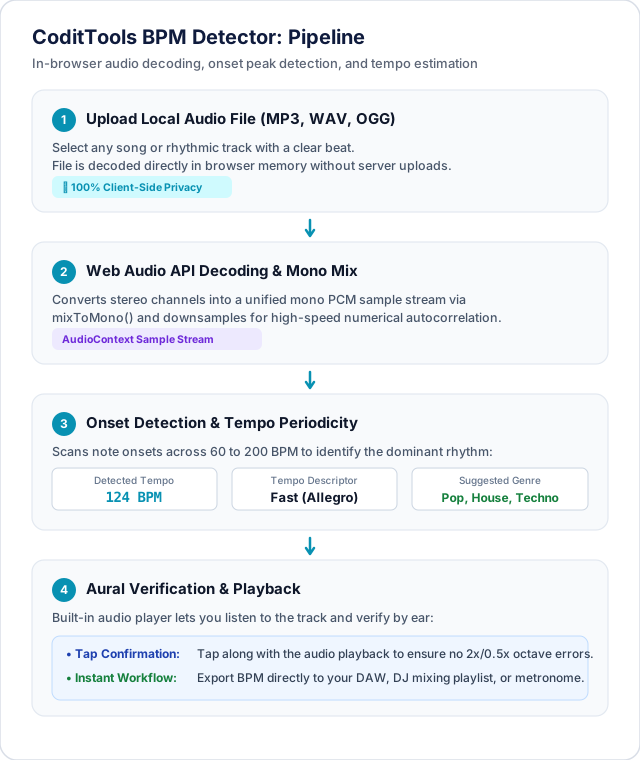
How In-Browser BPM Detection Operates:
- Local Audio Decoding: When you select an MP3, WAV, or OGG file, the browser decodes the compressed audio stream into raw uncompressed Pulse Code Modulation (PCM) floating-point sample buffers. No audio data is uploaded to remote servers.
- Low-Pass Filtering: The audio buffer is passed through a digital biquad low-pass filter (attenuating frequencies above 150 Hz to 200 Hz). This isolates the kick drum and bass transients while filtering out confusing vocal harmonies, guitars, and cymbals.
- Peak Energy Detection: The algorithm scans the filtered amplitude envelope to identify rhythmic energy peaks that cross a dynamic volume threshold.
- Interval Histogram Matching: The time differences between consecutive transient peaks are grouped into a statistical interval histogram across the standard musical range of 60 to 200 BPM. The tempo bucket with the highest statistical recurrence represents the primary BPM of the track.
The Common Half-Time vs Double-Time Trap
The most common conundrum encountered in both manual tap tempo and automated audio analysis is the half-time / double-time dilemma. Consider modern Trap, Dubstep, or Drum & Bass music:
- In a modern Trap song, the hi-hats skitter rapidly in 16th and 32nd notes, the kick patterns syncopate at 140 BPM, but the snare drum only cracks on beat 3 (70 BPM half-time feel).
- If you tap your foot to the slow snare pulse, your tap tempo calculator will report 70 BPM. If you tap along to the rapid bouncing pulse, it will report 140 BPM.
Both answers are mathematically correct! 70 BPM and 140 BPM represent the exact same rhythmic grid. If a software tool or delay pedal reports a tempo that feels twice as fast or half as slow as your arrangement requires, simply multiply or divide the resulting BPM by 2.
Frequently Asked Questions About Tap Tempo and BPM
How many times should I tap to get an accurate BPM reading?
For best results, tap rhythmically between 6 to 10 consecutive times. Tapping only two times captures immediate human motor jitter. By the eighth tap, moving average algorithms smooth out individual millisecond variances and yield a stable, accurate reading down to fractional BPM decimals.
Can a song have a decimal tempo (e.g., 123.5 BPM)?
Yes. While most commercial electronic dance tracks are locked to whole-number metronomes (like 124.0 or 128.0 BPM), songs recorded by live human bands, vintage analog disco records, or tape-transferred tracks frequently drift into fractional tempos or fluctuate continuously across verse and chorus sections.
Why did the BPM detector identify 80 BPM when the song feels like 160 BPM?
This is a classic half-time detection result. If an automated algorithm or human user tracks the primary snare backbeat rather than the rapid eighth-note groove, the detected tempo will be exactly half the perceived tempo. Multiplying 80 BPM by 2 confirms the true 160 BPM arrangement grid.
What is the difference between tempo and rhythm?
Tempo is the speed or frequency of the underlying pulse (measured in BPM). Rhythm is the actual pattern of notes, syncopations, and silences played on top of that pulse. Two songs can share the exact same 120 BPM tempo while featuring completely different musical rhythms (e.g. a steady four-on-the-floor disco beat versus a syncopated Latin salsa rhythm).
Summary and Next Steps
From synchronizing studio delay units and programming live synthesizer arpeggiators to beatmatching DJ playlists and measuring athletic cadences, tap tempo remains the quickest and most versatile way to quantify musical rhythm. By understanding the core interval formula (BPM = 60,000 / Δt) and utilizing moving averages, you can reliably calculate the tempo of any groove within seconds.
Looking to analyze audio files, find song tempos, or audit track speeds directly in your web browser? Test your audio files with the free CoditTools BPM Detector. To explore complementary utilities for audio processing and sound design, explore our Audio Speed & Pitch Changer, Voice Recorder, and our full collection of Audio Tools.
Try the tools mentioned in this post - all free, no account needed.
Runs in your browser. No watermarks. No file uploads to a server.
Browse audio & music tools →