How Loan EMI Is Calculated: Formula, Worked Example and Extra Payments
The EMI formula with a worked 500,000 loan: interest vs principal each month, how term and rate change the cost, extra payments and flat vs reducing rates.
An EMI (equated monthly instalment) is the fixed amount you pay every month on a loan that charges interest on the remaining balance. It is calculated with one formula from three inputs: the amount borrowed, the interest rate and the number of months. The monthly figure is easy to get from a calculator. What it doesn't tell you is how the loan behaves: how slowly the balance falls at first, how much the term and the rate change the total interest, and what an extra payment saves.
Every number in this guide was calculated with the same code that runs the CoditTools Loan Calculator, so you can reproduce each example there.
The EMI formula
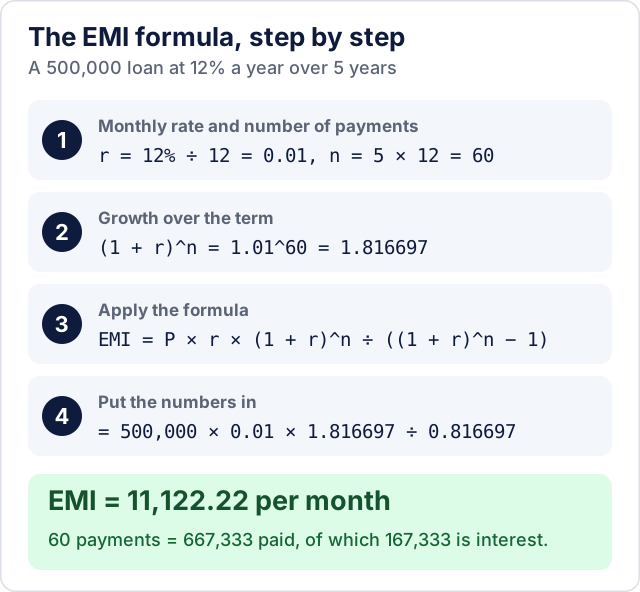
EMI = P × r × (1 + r)^n ÷ ((1 + r)^n − 1)- P is the principal, the amount you borrow.
- r is the monthly interest rate: the annual rate divided by 12, written as a decimal. 12% a year is 0.12 ÷ 12 = 0.01.
- n is the number of monthly payments: 5 years is 60.
At 0% interest the formula divides by zero, so the payment is simply P ÷ n; a 120,000 interest-free loan over 12 months is 10,000 a month.
Worked example: 500,000 at 12% for 5 years
- r = 12 ÷ 12 ÷ 100 = 0.01, and n = 5 × 12 = 60.
- (1 + r)^n = 1.01^60 ≈ 1.816697.
- Top: 500,000 × 0.01 × 1.816697 ≈ 9,083.48.
- Bottom: 1.816697 − 1 = 0.816697.
- EMI = 9,083.48 ÷ 0.816697 ≈ 11,122.22.
Over 60 payments you pay 667,333 in total, so the loan costs 167,333 in interest, about a third of the amount borrowed.
Where each payment goes
The EMI stays the same, but its make-up changes every month. Each month the lender first charges interest on the balance you still owe (balance × r), and whatever is left of the payment reduces the balance:
| Month | Payment | Interest (balance × 1%) | Principal repaid | Balance after payment |
|---|---|---|---|---|
| 1 | 11,122.22 | 5,000.00 | 6,122.22 | 493,877.78 |
| 2 | 11,122.22 | 4,938.78 | 6,183.45 | 487,694.33 |
| 3 | 11,122.22 | 4,876.94 | 6,245.28 | 481,449.05 |
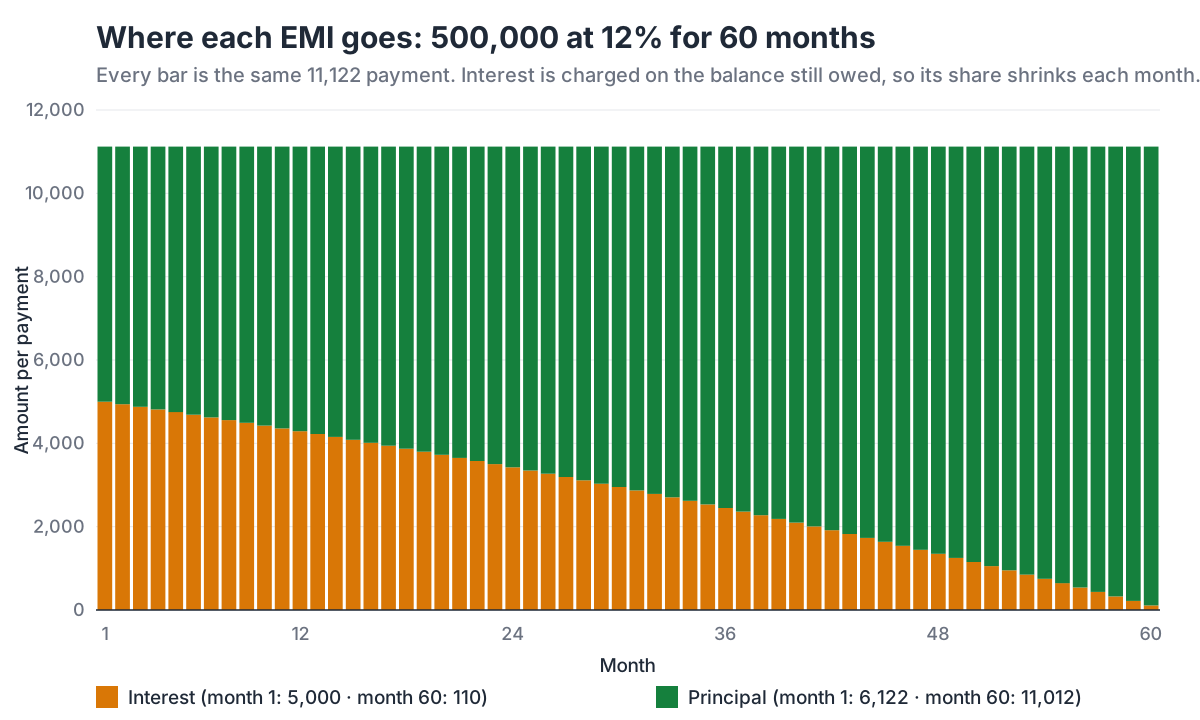
Because interest is front-loaded, the balance falls slowly at the start:
- In the first 12 months you pay 133,467, of which 55,822 is interest and only 77,645 reduces the loan. The balance is still 422,355.
- Half of the original 500,000 is not repaid until month 35, well past the halfway point of the term.
- The last 12 payments contain just 8,285 of interest in total.
This is why a loan that is "two years in" can still have a surprisingly large balance (334,862 after 24 payments in this example), and why paying extra early saves more than paying extra late.
What the term does to the total interest
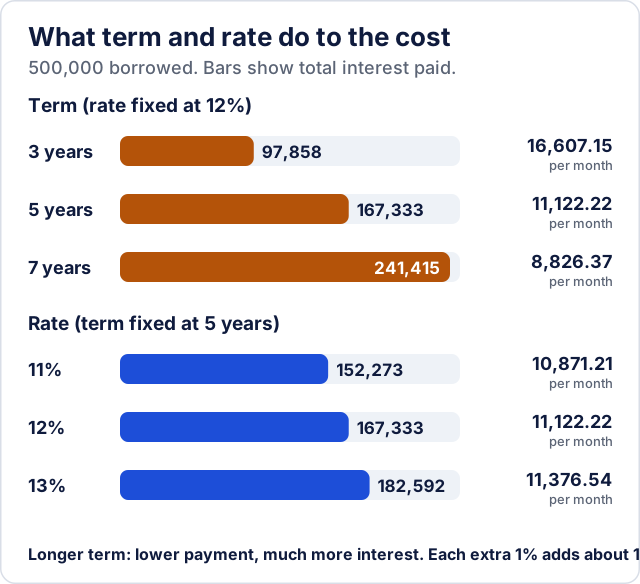
A longer term lowers the monthly payment but makes you pay interest on a larger balance for longer. The same 500,000 at 12%:
| Term | EMI | Total interest |
|---|---|---|
| 3 years (36 months) | 16,607.15 | 97,858 |
| 5 years (60 months) | 11,122.22 | 167,333 |
| 7 years (84 months) | 8,826.37 | 241,415 |
Going from 5 to 7 years cuts the payment by about 2,300 a month but adds about 74,000 of interest. Choose the shortest term whose payment you can keep up comfortably, not the lowest payment on offer.
What the rate does
On the same 500,000 over 5 years, each percentage point of interest changes the payment by roughly 250 a month and the total interest by about 15,000:
| Annual rate | EMI | Total interest |
|---|---|---|
| 11% | 10,871.21 | 152,273 |
| 12% | 11,122.22 | 167,333 |
| 13% | 11,376.54 | 182,592 |
The effect grows with the amount and the term, which is why a fraction of a percentage point is worth negotiating on a 20-year home loan.
What an extra monthly payment saves
Anything you pay above the EMI goes straight to the principal, so less interest builds up every following month. Paying 2,000 extra each month on the 500,000 example:
- clears the loan in 49 months instead of 60 (11 payments fewer);
- saves 34,703 of interest;
- makes the last payment only 2,763.64.
Before you plan on this, check your loan agreement: some lenders charge a fee for paying early, cap how much you can prepay each year, or apply extra money to future instalments rather than to the principal. Ask that extra payments reduce the principal.
Flat rate versus reducing balance
The EMI formula above uses the reducing-balance method: interest is charged only on what you still owe. Some lenders, often for personal and vehicle loans, quote a flat rate instead, which charges interest on the full original amount for the whole term.
A 10% flat rate on 500,000 for 5 years means 500,000 × 10% × 5 = 250,000 of interest, or 750,000 ÷ 60 = 12,500 a month. A reducing-balance loan with that same 12,500 payment has a rate of about 17.27%. The two numbers describe the same loan, so a flat rate always looks much cheaper than it is. When you compare offers, ask for the reducing-balance rate or the annual percentage rate (APR) of each one, not the flat rate.
What an EMI calculator leaves out
- Fees and insurance. Processing fees, mandatory loan insurance and taxes on fees are not part of the EMI, but they are part of what the loan costs you.
- Rate changes. With a floating or variable rate, the lender recalculates the payment or the term when the rate moves; a calculator assumes one rate for the whole loan.
- The lender's exact method. Lenders may calculate interest daily, round each instalment, or adjust the first payment for a partial month, so their schedule can differ from a calculator's by small amounts. The lender's own schedule is the one that counts.
Using the CoditTools Loan Calculator
The Loan Calculator has three modes:
- Monthly EMI shows the monthly payment, plus the total interest and total repayment.
- Total Interest puts the total interest first, for comparing what different offers cost overall.
- Simple Interest calculates principal × rate × years for loans that charge simple interest; it has no monthly schedule.
You can enter the term in years or in months (it must come to a whole number of months), set the rate to 0 for an interest-free loan, and choose one of nine currencies for display. In the EMI and Total Interest modes, the Extra monthly payment field shows how many months and how much interest an extra payment saves, and the month-by-month table can be downloaded as a CSV file for a spreadsheet. The calculation runs in your browser, and the figures are estimates, not an offer from a lender.
For a home loan with a down payment, the mortgage calculator starts from the property price instead of the loan amount. If you are paying down a credit card, where the balance and payments change from month to month, the credit card payoff calculator is the better fit.
Try the tools mentioned in this post - all free, no account needed.
Runs in your browser. No watermarks. No file uploads to a server.
Browse finance calculators →