How Many Pages Is 1,000 Words? Word Count, Formatting and Page Length Explained
1,000 words is about 2 pages single-spaced and 4 double-spaced. A layout test shows how font, word length, margins and headings change that, plus a calculator.
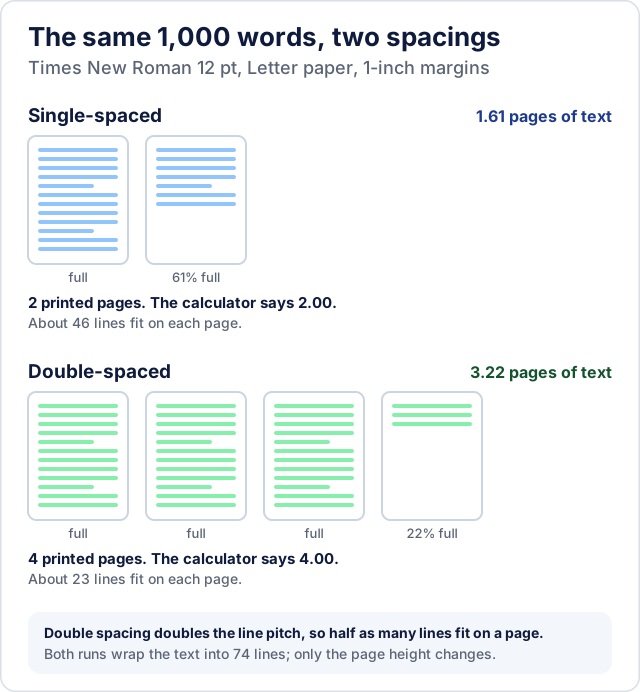
The usual answer is that 1,000 words is about 2 pages single-spaced and 4 pages double-spaced, in Times New Roman 12 pt on Letter paper with 1-inch margins. That is a rule of thumb: it assumes 500 words on a single-spaced page and 250 on a double-spaced one. Measured on plain text in that format, 1,000 words filled 1.61 pages single-spaced and 3.22 double-spaced, which prints on 2 and 4 pages, so the rule gets the printed-page answer right. What it hides is how far the result moves with word length, margins, headings and lists: in the layout test described below, the same 1,000 words ran from about 2.7 to 4.4 pages of text when double-spaced.
This guide keeps two kinds of numbers apart, and every table says which one it uses. The estimates come from the CoditTools Words to Pages calculator, which divides a word count by a fixed number of words per page. The measurements come from a layout test run for this article: synthetic text laid out in Chrome and measured, not Microsoft Word. Such a test depends on the software, fonts and text used, so a test run elsewhere will not match these figures exactly. The useful result is how much each setting changes the page count. The section How the layout test was run gives the method.
Pages for 250 to 3,000 words
| Words | Single: calculator | Single: layout test | Double: calculator | Double: layout test |
|---|---|---|---|---|
| 250 | 0.50 | 0.41 | 1.00 | 0.83 |
| 500 | 1.00 | 0.80 | 2.00 | 1.61 |
| 750 | 1.50 | 1.22 | 3.00 | 2.43 |
| 1,000 | 2.00 | 1.61 | 4.00 | 3.22 |
| 1,500 | 3.00 | 2.39 | 6.00 | 4.78 |
| 2,000 | 4.00 | 3.18 | 8.00 | 6.35 |
| 3,000 | 6.00 | 4.76 | 12.00 | 9.52 |
Assumptions. Times New Roman 12 pt, Letter paper (8.5 × 11 in), 1-inch margins, left-aligned text. The calculator columns are the tool's own output for those settings. The layout-test columns use plain paragraphs, with no title page, headings or references (the method is described in How the layout test was run). The test text averages 5.3 letters per word, about 6.4 characters including spaces, so it is a medium-length-word text; real writing varies, as the word-length section shows. In the test, single spacing was set to the font's own line height and double spacing to twice that; these are the test's settings, not a statement of how Word defines spacing.
At 1,000 words the two sources agree on the whole-page answer. Double-spaced, the calculator says 4.00 pages, and the layout test fills 3.22 pages, which prints on 4 sheets because the fourth is partly filled. Pages of text, the figures in the table, are not the same as printed pages, which are always whole numbers.
Where the calculator's numbers come from
The calculator does one division: pages = words ÷ words per page. The words-per-page figure comes from a small table of "typical figures" for 12 pt text, which the tool's code describes as assuming about 1-inch margins and plain paragraphs:
| Font, 12 pt | Single | 1.5 lines | Double |
|---|---|---|---|
| Times New Roman | 500 | 333 | 250 |
| Arial | 400 | 267 | 200 |
| Calibri | 450 | 300 | 225 |
For 10, 11 or 14 pt the figure is scaled by 12 ÷ size, so 1,000 words in Times New Roman double-spaced is 4.00 pages at 12 pt, 3.67 at 11 pt and 4.67 at 14 pt. The tool does not lay out any text: it has no margin, paper-size, heading or paragraph setting.
The 250-words-per-double-spaced-page figure is an old rule. Author William Shunn traces it to typewriter-era layouts, with ten characters to the inch and about 25 double-spaced lines to a page, and explains that proportional fonts fit more characters on a line, so the figure no longer holds (Shunn, 2021). The layout test points the same way for plain paragraphs. In Times New Roman 12 pt double-spaced, 23 lines fit on a page and the test text ran about 13.5 words to a line, so a page held roughly 310 words of this test text, not 250. The calculator's 250 only matched the test when the text was made of longer words (3.91 pages for 1,000 words). In this test the calculator ran on the long side for plain paragraphs, so treat it as a cautious planning figure. Headings, quotations, tables and images, which a word count cannot see, add length back.
Font and size differences show the same pattern:
| 1,000 words, 12 pt | Single: calculator | Single: layout test | Double: calculator | Double: layout test |
|---|---|---|---|---|
| Times New Roman | 2.00 | 1.61 | 4.00 | 3.22 |
| Arial | 2.50 | 1.78 | 5.00 | 3.57 |
| Calibri | 2.22 | 1.68 | 4.44 | 3.36 |
The calculator makes Arial 25% longer than Times New Roman and Calibri 11% longer; the test found 11% and 4%. For size, the calculator takes about 8% off the page count at 11 pt and adds about 17% at 14 pt; the test found 14% off and 37% added, because a different size changes both the characters per line and the lines per page. Treat the font and size settings as direction, not precision.
What else moves the page count
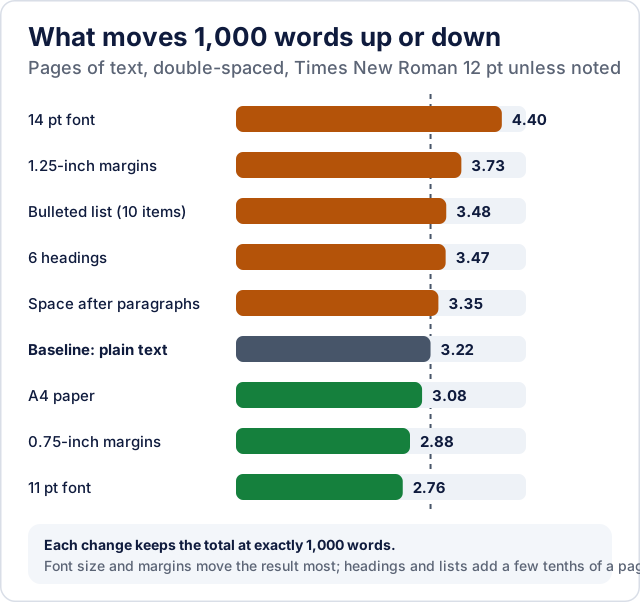
With 1,000 words fixed, double-spaced in Times New Roman 12 pt, the layout test gave these results. Headings and list items are counted inside the 1,000 words, so each row compares like with like:
- Font size: 11 pt gives 2.76 pages and 14 pt gives 4.40, against 3.22 at 12 pt.
- Margins: 0.75-inch margins give 2.88 pages and 1.25-inch margins give 3.73.
- Headings: six two-word headings add about a quarter of a page (3.47).
- A bulleted list: ten items of six words add about the same (3.48).
- Space after each paragraph, with no indent: 3.35 pages with a 12 pt gap.
- A4 instead of Letter: 3.08 pages, because A4 is slightly narrower and taller.
Tables and images were not part of the test. A table is set in rows that do not wrap like prose, and an image takes its own height, so both add length that no word count predicts.
Word count is not character count
A page fills with characters, not words, and words differ in length. To show it, the same test used three versions of a 1,000-word text. Double-spaced in Times New Roman 12 pt, the shorter-word text (about 4.3 letters a word) filled 2.70 pages, the medium one (5.3) filled 3.22 and the longer one (6.7) filled 3.91. Their character counts, spaces included, were about 5,400, 6,400 and 7,700.
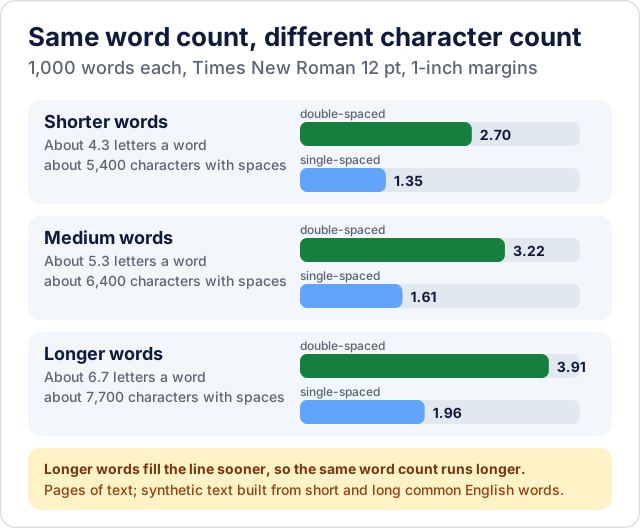
The calculator takes a word count and nothing else, so it cannot see how long your words are. In Microsoft Word the word count is in the status bar, and clicking it opens a Word Count box that also shows characters, lines and paragraphs (Microsoft). The CoditTools Word Counter reports words, characters with spaces and paragraphs for pasted text. The two numbers are not interchangeable, so use whichever your assignment or form asks for.
One thing can inflate a word count: text copied from a PDF may have words split across lines with a hyphen, and a tool that splits on whitespace, as the Word Counter does, counts each half as a word. Cleaning up the line breaks first, and fixing split words, gives a more honest count.
Essays, reports, manuscripts and web content
Essays. Style guides set the format, and the format sets the pages. MLA, as described by Purdue OWL, asks for a 12 pt legible font such as Times New Roman, a double-spaced paper, 1-inch margins and a half-inch first-line indent (Purdue OWL). The APA 7 student paper setup guide also asks for 1-inch margins, a half-inch indent and double-spacing for the entire paper, including block quotations and the reference list, with no extra space before or after paragraphs. It allows several fonts, among them 12 pt Times New Roman, 11 pt Calibri and 11 pt Arial, and it counts the title page as page 1 (APA). So a page requirement may or may not include a title page or references: check your instructor's rule, because the word count and the page count may not cover the same parts of the document.
Reports. A report that is single-spaced, with headings and space between paragraphs, should be estimated from the single-spaced column, with extra length for the headings and spacing (the layout test measured those double-spaced only). If it also has tables and images, treat the estimate as a floor.
Manuscripts. Shunn, writing about fiction submissions, says publishers today use the computer-generated word count, not the old page-based estimate. For a manuscript, quote the word count and leave pages out of it.
Web content. A web page has no fixed page size: its length depends on the reader's screen width, text size and layout. Use the word count, not a page count.
Estimate pages with the Words to Pages tool
The Words to Pages tool asks for a word count, a font (Times New Roman, Arial or Calibri), a size (10, 11, 12 or 14 pt) and a line spacing (Single, 1.5 Lines or Double). After you press Calculate, it shows the estimated pages to two decimals and the whole pages that figure falls between, the word count and your settings. From then on the result follows each setting you change. A word count with a comma, such as 1,500, is read as 1500.
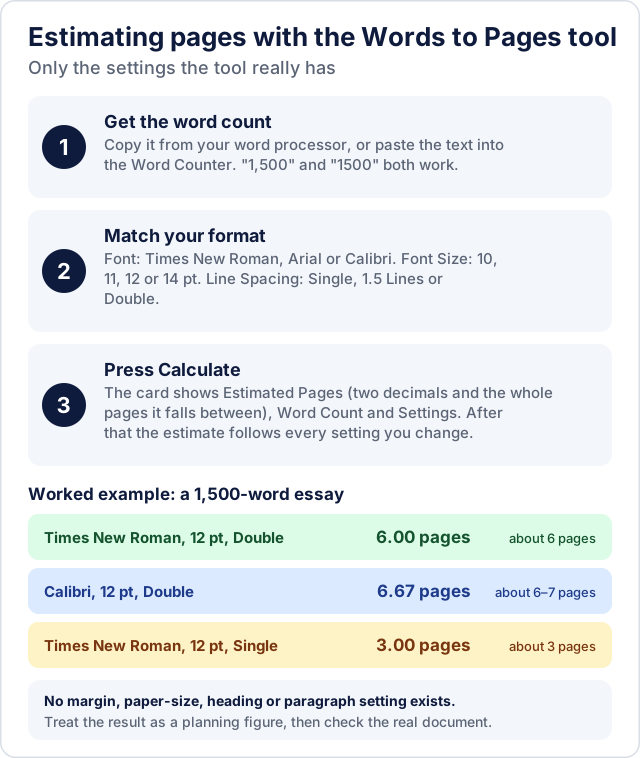
A worked example: for a 1,500-word essay in Times New Roman 12 pt double-spaced, the tool shows 6.00 pages. Switch the font to Calibri and it shows 6.67, about 6 to 7 pages; switch the spacing to single and it shows 3.00. The layout test put the same essay at 4.78 pages of text in Times New Roman double-spaced, so a real document of that length can land anywhere between the two figures, and above both if it has headings and quotations. Use the calculator to plan, and the page count of your finished document as the final answer.
Working backwards from a page requirement
If you are given pages and need words, multiply the pages by the words per page. In Times New Roman 12 pt double-spaced:
| Pages needed | Calculator (250 words a page) | Layout test (about 310 words a page) |
|---|---|---|
| 2 | 500 | about 620 |
| 3 | 750 | about 930 |
| 5 | 1,250 | about 1,550 |
| 10 | 2,500 | about 3,100 |
The layout column is the 1,000 words in 3.22 pages ratio carried across, so it applies only to plain paragraphs with these settings. For a minimum page requirement, writing toward the higher word count is the safer side, and the finished document's own page count settles it.
How the layout test was run
The test measures how many pages of text a given number of words fills, using Chrome as the layout engine. It is not Microsoft Word, and Word may wrap lines differently.
- Browser and system. Desktop Chrome in headless mode on Windows 11. The installed Chrome was version 154.0.8037.98 when this section was written, but the version was not logged during the run.
- Fonts. The Times New Roman, Arial and Calibri installed on that Windows machine. Line height was read from the font files
times.ttf,arial.ttfandcalibri.ttfin the Windows Fonts folder: the font's own line height (ascent, descent and line gap) is 1.15 times the font size for Times New Roman and Arial and 1.22 times for Calibri. Single spacing used that height, 1.5 lines used 1.5 times it and double spacing twice it. - Page. Letter paper (A4 for one row), 1-inch margins unless stated, so a 6.5-inch text column. At 12 pt that fits 46 single-spaced, 31 one-and-a-half-spaced or 23 double-spaced lines of Times New Roman per page.
- Text. Synthetic text from common English words, not real prose. A script picked words at random with a fixed seed from a list of 300 common words averaging 4.3 letters, and built sentences of 8 to 20 words and paragraphs of about 110 to 150 words. For the medium text each word had a 22% chance of coming instead from a list of 83 longer words averaging 9.2 letters, and for the longer text a 50% chance. That gives the 4.3, 5.3 and 6.7 letters per word used in this guide. The sentences make no sense, but the word-length mix is controlled.
- Formatting. Left-aligned text with a 0.5-inch first-line indent and no space between paragraphs, and no hyphenation setting applied. The six headings were bold, two words each, at 14 pt with a 12 pt gap below. The list was ten items of six words, indented 0.5 inch.
- Counting. Pages of text are the height of the laid-out text divided by the height of one page of lines, so the last page counts as a fraction. Each setting was laid out once on the same fixed-seed text; no runs were repeated or averaged, and the script is not published here.
- Cross-check. Printing the same text to PDF in Chrome gave the same number of printed pages in the seven cases tried.
Real documents differ in word choice, punctuation, paragraph length and software, so treat these figures as how much each setting moves the page count, not as a prediction for your file.
Questions readers ask
Is 1,000 words 3 pages or 4?
Double-spaced in Times New Roman 12 pt, plain text in the layout test fills a little over 3 pages and prints on 4, and the calculator estimates 4.00. Single-spaced it is about 1.6 pages of text on 2 printed pages.
Why is my document longer than the estimate?
Anything a word count cannot see adds length: title pages, headings, block quotes, tables, images, reference lists and short paragraphs that leave a line mostly empty. In the layout test, six headings alone added about a quarter of a page.
Does it matter whether I use Letter or A4?
A little. The calculator assumes either size with about 1-inch margins and has no paper-size setting. In the layout test, A4 gave 3.08 pages for 1,000 words double-spaced, against 3.22 on Letter.
How accurate is this?
Treat it as an estimate. The calculator is a division with fixed words-per-page figures, and the layout test used synthetic text in a browser engine, not Word (method above). Different software wraps lines slightly differently, so exact page counts can only come from your own document.
Try the tools mentioned in this post - all free, no account needed.
Runs in your browser. No watermarks. No file uploads to a server.
Browse text tools →